FileZilla is one of the most used FTP clients there is, and "is FileZilla safe" is one of the most searched questions about it. The usual answers are opinions. So we did what a person does: searched Google for "filezilla download", followed the results, downloaded what each one gave us into a separate test copy of Windows 11, and checked every file: is it the real thing, who signed it, and what does Microsoft Defender say. We also ran FileZilla's own two installers.
The short version: FileZilla itself is safe. Every copy of the real program we got was signed, by its developer Tim Kosse (or, for the Portable packages, by PortableApps.com), and Defender found no malware in any of them. Where you download it matters a lot more than the program.
The verdict in 30 seconds
- The FileZilla program is safe, and so is its plain installer (under "Show additional download options" on filezilla-project.org). It offered nothing besides FileZilla.
- The big green button on FileZilla's own site gives you a different installer, one that comes with an offer (on
our run, Google Chrome). Microsoft Defender detects that installer as
PUABundler:Win32/FileZilla_BundleInstaller, a potentially unwanted bundler. The site warns you under the button: "This installer may include bundled offers." - Google's #1 result for "filezilla download" was not FileZilla at all. It was a GitHub page made to look like
FileZilla's, which led through a chain of throwaway websites to a 115 MB zip. Inside was a file Microsoft Defender
detects as
Trojan:Win32/Wacatac.H!ml. - Download sites mostly served the real FileZilla, but often an old version, and usually behind ads designed to look like download buttons. One served FileZilla's offer-carrying installer under a new name.
- Saved passwords: at its defaults, FileZilla stores them in a form any program on your PC can read. Setting a master password fixes that.
From my own experience, dealing with antivirus vendors isn't easy, and false positives are a common story for software installers. In FTPie's early days we reached out to several vendors ourselves to get alarms removed. FTPie carries a full CefSharp browser so its embedded apps can work, and that triggered some vendors, because adware often uses the same embedded browser. So it mattered to me to see how things really look for FileZilla.
Where Google sent us, and what we got
| Source | What it gave us | Real FileZilla? | Version | Defender |
|---|---|---|---|---|
| filezilla-project.org, main button | Installer with an offer (Chrome) | yes, signed | 3.71.1 (current) | PUABundler:Win32/FileZilla_BundleInstaller |
| filezilla-project.org, "additional download options" | Plain installer, or a zip | yes, signed | 3.71.1 | no threats |
| github.com/"FileZilla-Server"/… (Google #1) | A 115 MB zip after 4 redirects | no | – | Trojan:Win32/Wacatac.H!ml |
| A GitHub gist titled "FileZilla for Windows" | Gone by the time we checked | – | – | – |
| sooftware | Plain installer (we got the 32-bit one) | yes, signed | 3.71.1 | no threats |
| FilePuma | The offer-carrying installer, renamed | yes, signed | 3.71.1 | PUABundler:… |
| MajorGeeks | The zip ("due to the bundleware in the installer") | yes, signed | 3.71.1 | no threats |
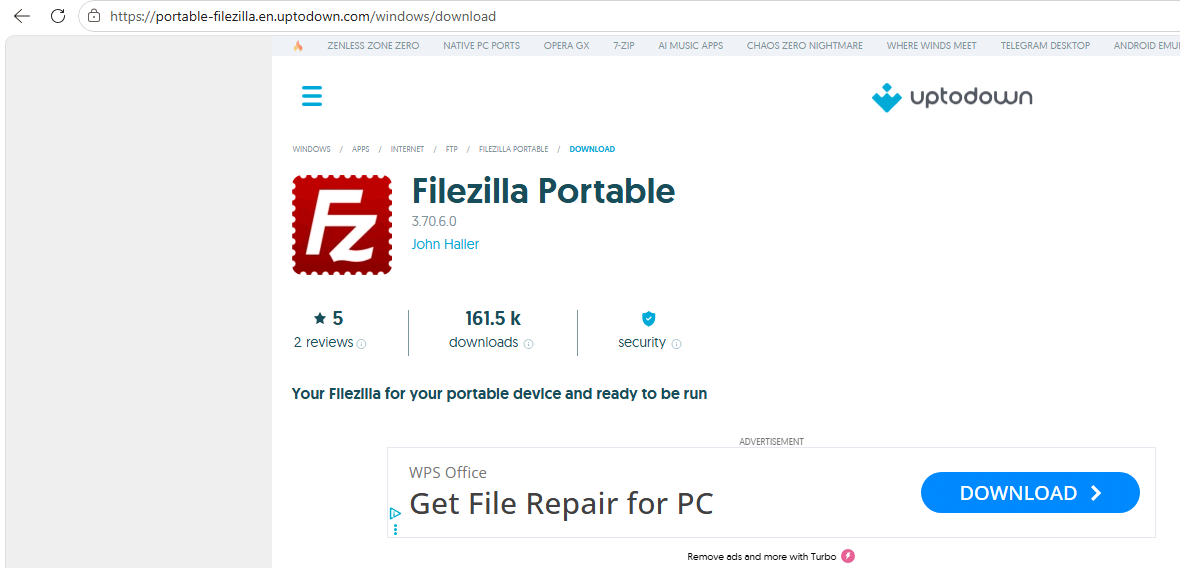
| Uptodown | FileZilla Portable (PortableApps.com's package) | yes, signed by PortableApps.com | 3.70.6 | no threats |
| SourceForge | Plain installer | yes, signed | 3.69.3 (old) | no threats |
| FileEagle | Plain installer | yes, signed | 3.58.0 (March 2022) | no threats |
| filezilla.cn (not the project's) | Plain installer, hosted on someone else's cloud storage | yes, signed | 3.68.1 (old) | no threats |
| filezilla.ru (not the project's) | Plain installer; FileZilla Portable 3.63.2 | yes, signed | 3.67.0 (old) | no threats |
| CNET, FossHub, Apponic, Softexia | No file: they send you to filezilla-project.org | – | – | – |
Chocolatey (choco install filezilla) |
Its package embeds the plain installer | yes (checksum matches) | 3.71.1 | – |
| winget | No FileZilla package | – | – | – |
"Signed" means the file carries a valid digital signature (FileZilla's developer, or PortableApps.com for the Portable packages), so it hasn't been altered since it was built. Not checked: software.informer and download.it (they refused our automated requests) and one unrelated spam page that ranked. VirusTotal results for the files that matter: see "What antivirus engines say" below.
FileZilla's own download button
On filezilla-project.org the main Download FileZilla Client button opens a choice of editions (FileZilla free,
FileZilla Bundle, Pro, Pro Bundle). "Download" for the free one gives you FileZilla_3.71.1_win64_sponsored2-setup.exe.
Right under the button, the site says: "This installer may include bundled offers. Check below for more options."
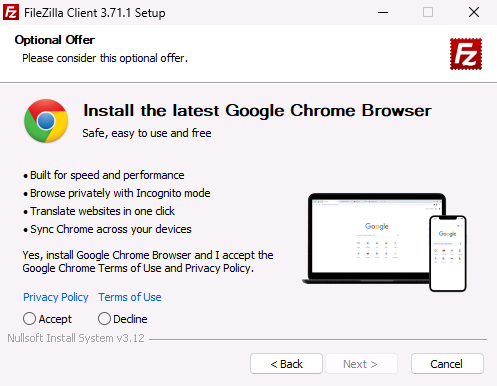
When we ran that installer (twice, each time on a freshly reset Windows), it fetched an offer from the internet and showed a page headed "Optional Offer: Install the latest Google Chrome Browser", with Accept and Decline. Neither was preselected and the Next button stayed greyed out until we chose, so you can't install Chrome by accident. After Decline, the next screens were the normal FileZilla ones. Offers can differ by day and country (we tested from Poland).
Microsoft Defender classifies this installer as PUABundler:Win32/FileZilla_BundleInstaller, a potentially
unwanted application (PUA) of the bundler kind. That is Microsoft's label for installers that bundle other software,
not a malware verdict. The plain installer from the same site, same version, is not flagged.
Whether Windows blocks it depends on the PC: Windows' "Potentially unwanted app blocking" setting (in Windows Security > App & browser control > Reputation-based protection). On our test machine Defender's PUA protection was in audit mode (it records a detection but doesn't block) and Edge's own PUA blocking was off, so the download and the installer went through without a word. We didn't test a fresh home install, and Microsoft's pages don't settle what one does: its Defender guide gives audit mode as the default on PCs no organisation manages, while its consumer page for Windows 10 says the blocking is off by default. So check the setting on your own PC.
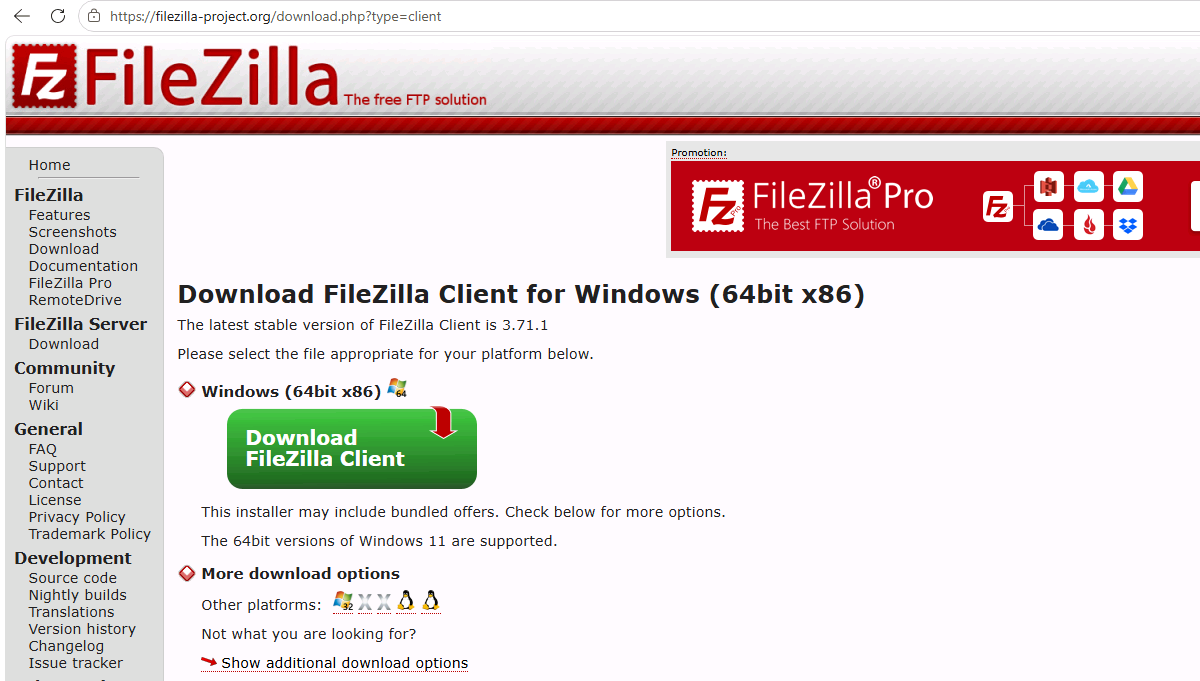
How to get FileZilla without the offer: on filezilla-project.org, click "Show additional download options" under
the button and take FileZilla_..._win64-setup.exe (or the .zip). That's the same FileZilla, without any offer.
Google's top result: a fake GitHub page and a trojan
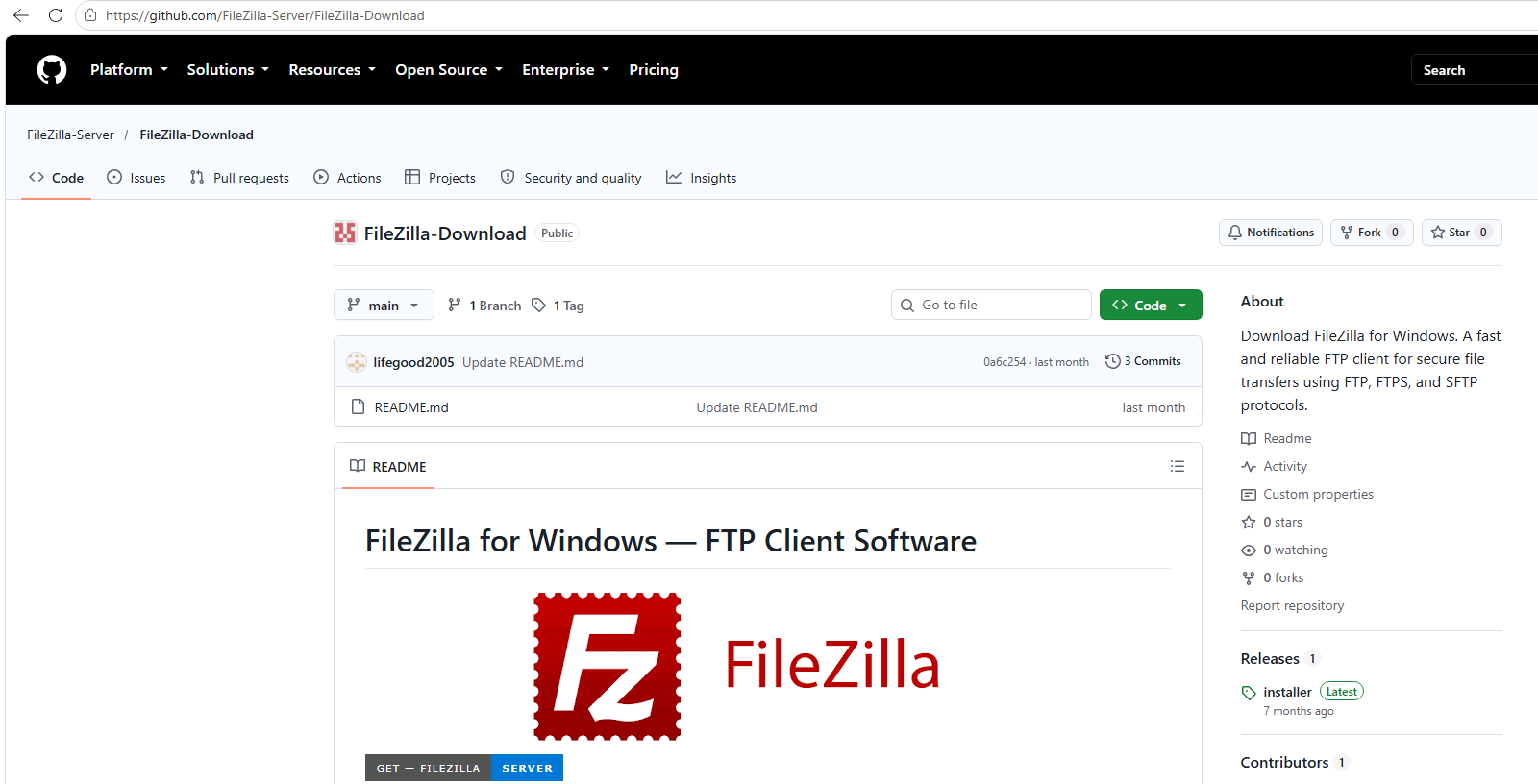
On 24 October 2026, Google's first organic result for "filezilla download" was a GitHub repository called FileZilla-Server/FileZilla-Download. It isn't FileZilla's: the "FileZilla-Server" account was created on 16 March 2026, five minutes before the repository, which has no code and no stars, only a README of generic FileZilla instructions and a big "GET FileZilla Server" button.
That button leads to another account's GitHub Pages site, which shows a convincing fake GitHub page ("Loading package… Preparing files for download"). Behind it, a script quietly loads code from another domain, which sends the browser through two more throwaway domains to a final page, again styled as GitHub, with a "Download Now" button. What it gives you is a 115 MB zip, mostly padding (inflating a file is a known way to slip past scanners that skip large files: MITRE ATT&CK calls it "binary padding", T1027.001). The page builds the archive for each visitor, and the checksum it announced didn't match the file it sent.
Inside the zip: a small program whose version details identify it as Microsoft's Connection Manager installer
(cmstp.exe), renamed (VirusTotal agrees: 0 of 61 engines flagged it, and it reads "File distributed by Microsoft"),
and next to it a file called cmutil.dll, which that Microsoft program loads when it starts. This is called DLL
side-loading: a genuine, trusted program is used to run the attacker's code. Two more large files pad the archive.
What Microsoft Defender did: it let the zip download and scanned it as clean. The moment the zip was unpacked,
real-time protection caught cmutil.dll as Trojan:Win32/Wacatac.H!ml and quarantined it. So a Windows PC with
Defender on and up to date would most likely be protected, but only at the last step. We did not run any of it.
When we tried the same page in a normal browser later, the chain sometimes sent us to an ordinary GitHub page instead: fake download chains often choose who gets the payload. By 24 October a second lure, a GitHub gist titled "FileZilla for Windows – Free FTP Client & Download", was already gone. On 5 November the repository was still on GitHub, but no longer in Google's top 20 for that search. We reported it to GitHub the same day.
Download sites: the real file, behind fake buttons
Most download sites gave us genuine, signed FileZilla files. The problems were elsewhere:
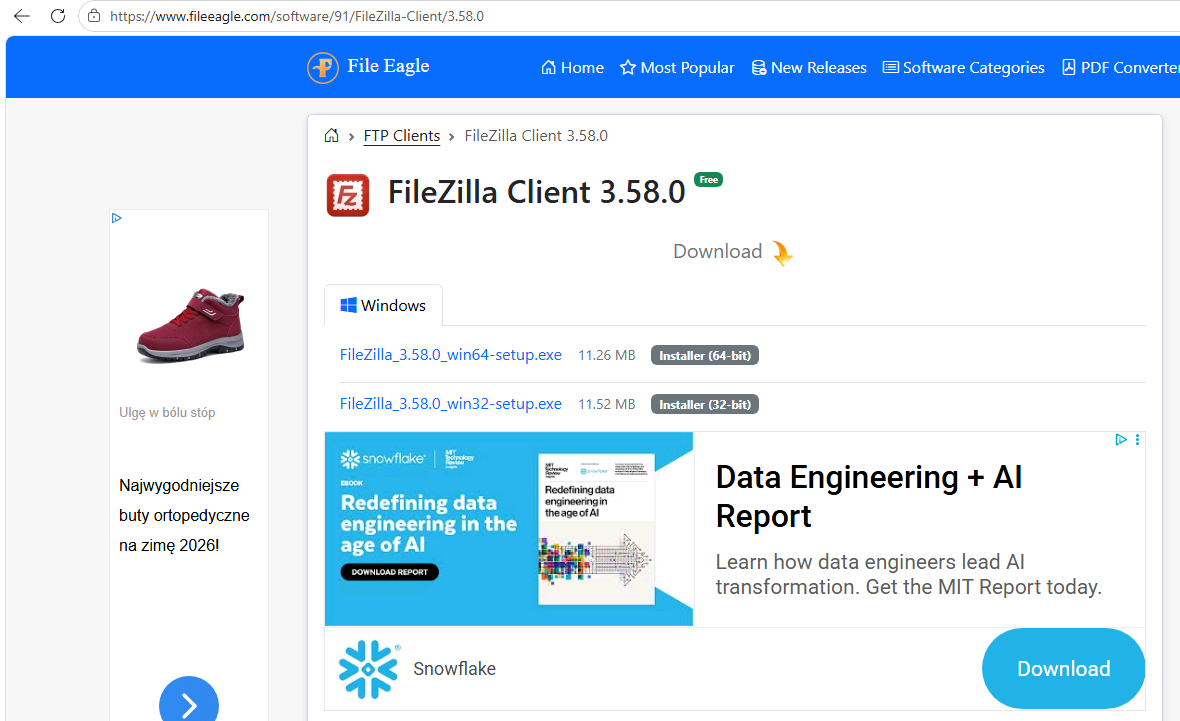
- Old versions. SourceForge's "latest" was 3.69.3; FileEagle's ranked page offered 3.58.0 from March 2022, thirteen versions behind (3.59 to 3.71, with their point releases); two unofficial mirrors had 3.67 and 3.68.
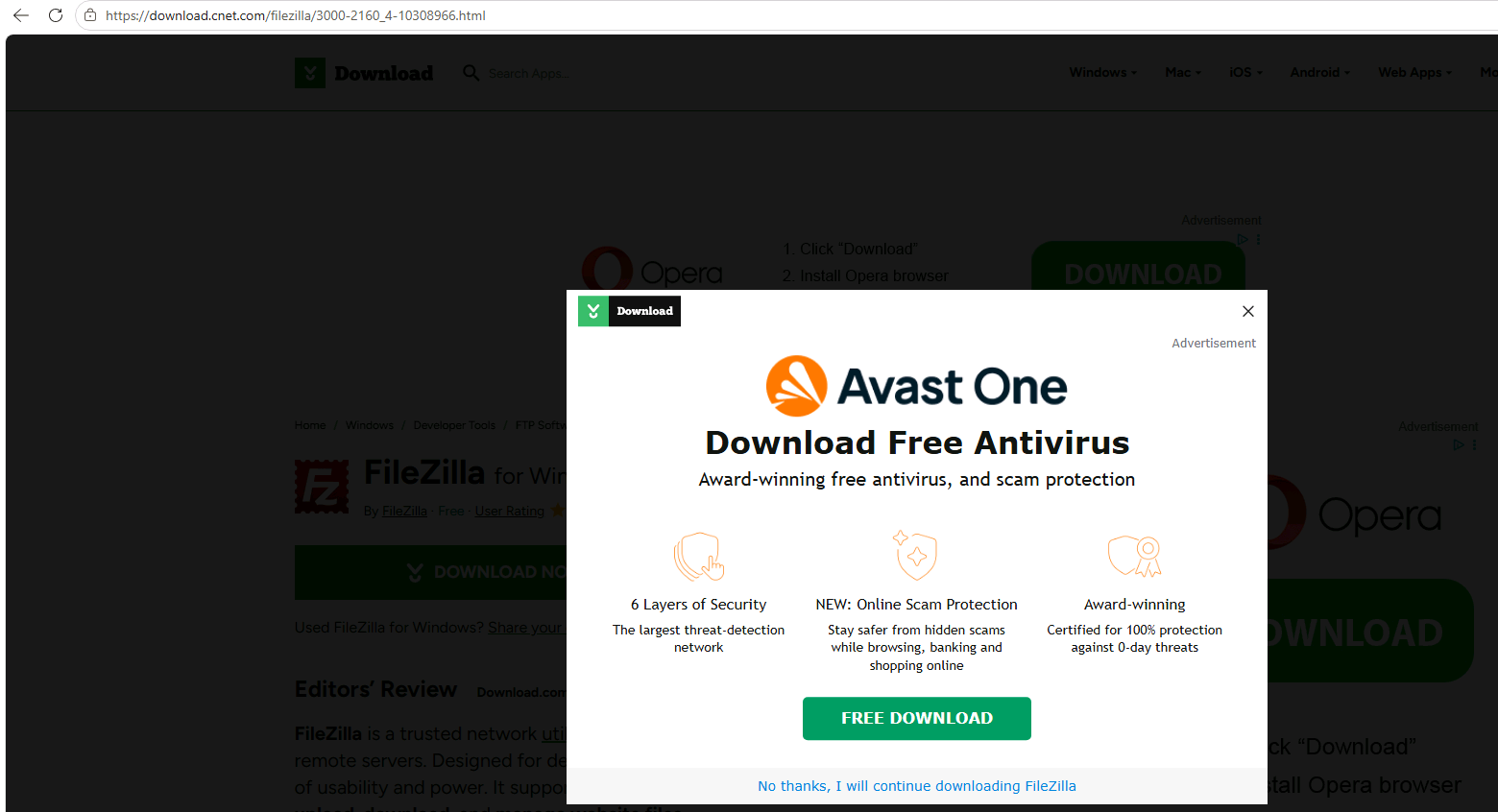
- Ads dressed as download buttons. On sooftware, Uptodown, Apponic and CNET, the first big button on the download page was an advertisement (texts like "Start download", "Continue to Access" or "Content ready: 2 steps", shown to us in Polish, and a WPS Office "Download" button); FileEagle put a Snowflake "Download" ad right under its file links. CNET also showed an Avast pop-up and then said "Your download has started" when nothing had; it hosts no file any more, and after a full-screen ad it sent us to filezilla-project.org.
- The offer, renamed. FilePuma's download was byte-for-byte FileZilla's offer-carrying installer, renamed
FileZilla_Client_(64bit)_v3.71.1.exe, so the "PUABundler" detection and the Chrome offer come with it. - The good ones. FossHub and Softexia simply link to the official site; MajorGeeks offers only FileZilla's zip, saying it does so "due to the bundleware in the installer"; Uptodown publishes a checksum you can verify (it matched).
What antivirus engines say
Defender is one opinion, so we also looked up the files that matter on VirusTotal, which shows what about 70 antivirus engines say about a file. We searched by hash, so nothing was uploaded. These are the results on 5 November 2026; each score links to its live report, so it may have changed.
| File | Engines that flagged it | What they said |
|---|---|---|
| FileZilla's plain installer | 0 of 70 | Nothing |
| FileZilla's installer with the offer | 9 of 69 | Six say adware or potentially unwanted, Microsoft among them. Three give a generic verdict with no named threat |
cmutil.dll, from the fake download |
39 of 69 | VirusTotal's summary label: trojan.yogi/stealer |
The renamed cmstp.exe, from the fake download |
0 of 61 | "File distributed by Microsoft" |
| The 115 MB zip, from the fake download | Not in VirusTotal | It had no record of this file, which fits a page that builds the archive for each visitor |
| FileZilla 3.58.0, from FileEagle | 1 of 68 | One generic verdict (W32.AIDetectMalware) on a genuine, signed file, last analysed seven months ago |
The gap between the first two rows is the offer: same program, same version, and the flags appear only on the installer that carries it.
Is FileZilla safe once installed? Saved passwords
The program is safe; one default is worth changing. At the first connection FileZilla asks whether to remember
passwords, with "Save passwords" preselected. Accept it, and your passwords go into your profile's FileZilla files (recentservers.xml, filezilla.xml, and
sitemanager.xml for saved sites) in base64, an encoding anyone can reverse in one step, so any program running as you can read them. Choose "Save
passwords protected by a master password" instead (or later in Settings > Interface > Passwords): we checked, and the
files then hold only encrypted data.
Is WinSCP safe?
The same checks on WinSCP 6.7: its installer, from winscp.net, is signed by its developer (Martin Prikryl) and had no offers at all. It doesn't save a password unless you tick "Save password (not recommended)"; if you do, it uses a reversible scrambling, so set a master password in either app. More in our WinSCP vs FileZilla test.
How to download FileZilla safely
- Go to filezilla-project.org yourself (type it), not a search result or a GitHub page.
- Click "Show additional download options" and take the plain installer or the zip.
- After downloading, right-click the file > Properties > Digital Signatures: it should say Tim Kosse.
- Ignore big buttons on download sites that don't name the exact file; look for the file name.
- Turn on Potentially unwanted app blocking (Windows Security > App & browser control > Reputation-based protection) if it's off.
- In FileZilla, set a master password before saving any passwords.
Another option: FTPie
We make FTPie, so we're not neutral, but the point of this page isn't to make FileZilla look bad or FTPie look good. FileZilla itself is safe, and the problems above are mostly around it, not in it.
If you'd rather not think about master passwords, FTPie encrypts every saved login by default (AES-256, with the key protected by Windows for your account, or by your own password if you turn on App Lock), and every file we ship is code-signed. It connects to FTP, FTPS and SFTP, and to cloud storage (with FTPie Pro).
How we tested
| Where | Google (United States, desktop) on 24 October 2026: "filezilla download" (top 30) and "download filezilla for windows" (top 20): 19 sources, 16 checked (two refused automated requests, one was an unrelated spam page), plus winget and Chocolatey |
| Machine | A Windows 11 Enterprise (evaluation) virtual machine, build 26100, started from a clean snapshot, browsing from Poland; Microsoft Edge 155, Microsoft Defender with that day's signatures (1.461.188.0 to 1.461.199.0), and FileZilla's official files re-scanned on 5 November with signatures from 27 October (1.461.224.0), same results |
| Each file | SHA-256 compared with FileZilla's official files; digital signature; Microsoft Defender scan; archives unpacked and every file inside checked; nothing from the fake chain was run (the test machine was not cut off from our network) |
| Installers | FileZilla's two official installers run from a clean state (the offer installer twice), every screen recorded (test 1 of our WinSCP vs FileZilla comparison); download-site files were checked, not installed |
| VirusTotal | Hash lookups on its website on 5 November 2026; nothing uploaded |
| Dates | 24 to 26 October 2026, re-checked 5 November. Download sites, offers and search results change daily: this is a snapshot |
FAQ
Is FileZilla safe to use? Yes. The FileZilla program is open source and signed by its developer, and Defender found no malware in any genuine copy we checked (it flags only the offer-carrying installer, as unwanted software). The risks are around it: the offer in the main installer, fake download sites, and the password default.
Is FileZilla malware? No. Microsoft Defender flags the installer behind FileZilla's main download button as a potentially unwanted bundler, because it offers other software; the program itself and the plain installer are not flagged.
Why does my antivirus flag FileZilla? Most likely you have the installer with offers (..._sponsored...-setup.exe).
Defender calls it PUABundler:Win32/FileZilla_BundleInstaller, and on VirusTotal 9 of 69 engines flagged it, against 0 of 70
for the plain installer. Use the plain installer from "Show additional download
options" instead.
Does FileZilla come with adware? Its main installer may include an offer (on our run, Google Chrome, with Accept and Decline, neither preselected). The plain installer has no offers.
Is FileZilla from GitHub safe? FileZilla isn't distributed on GitHub. The GitHub repository at the top of Google when we searched was fake, and the file it led to contained what Defender detects as a trojan.
Where are FileZilla passwords stored? In your profile's FileZilla folder (%APPDATA%\FileZilla): sitemanager.xml
for saved sites, recentservers.xml and filezilla.xml for recent ones, in base64 unless you set a master password.
Is WinSCP safer than FileZilla? Its installer has no offers, and it doesn't save passwords unless you ask it to. Both programs are safe; set a master password in either if you save passwords.