Comparison

FTPie vs NetDrive

Mount your storage as a drive, or manage it in a real file manager you buy once.

FTPie - FTP + cloud file manager with built-in tools vs NetDrive - Network & cloud drive mounter

Updated July 2026

NetDrive is a long-running Windows (and Mac) tool for mounting cloud, FTP and NAS storage as a drive. It is a capable mounter with broad protocol support and is popular for making a NAS or FTP server appear in Explorer. FTPie takes the file-manager route instead, and is sold once rather than on subscription.

As always with these tools, the real question is how you want to interact with your files: a mounted drive every app can see (NetDrive), or a dedicated workspace to manage everything (FTPie).
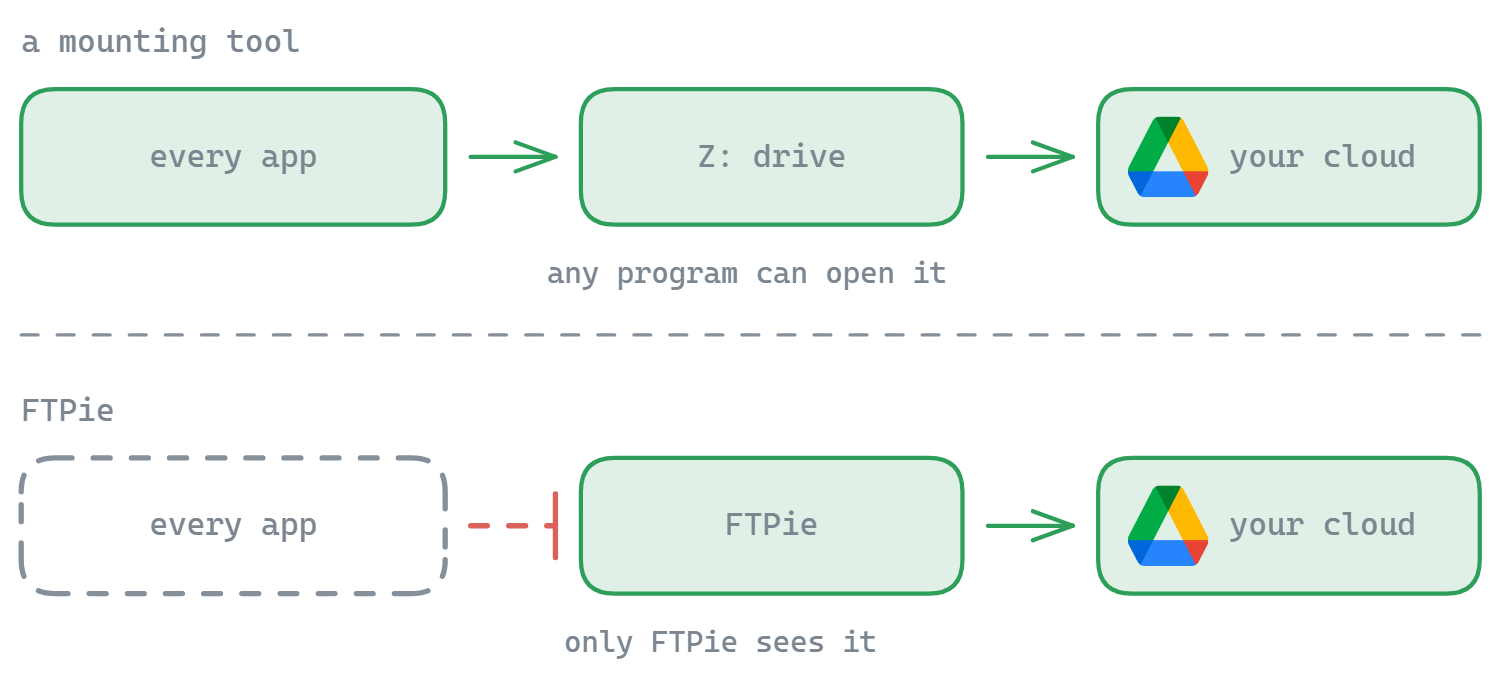
How NetDrive works

NetDrive connects an account and presents it as a drive letter, with caching to smooth over network latency. It covers a wide range of backends - cloud services, FTP/SFTP/WebDAV and NAS - and is generally licensed as a subscription. Its job is access, not file management; organizing and moving files is still done through Explorer.

How FTPie works

FTPie is a dual-pane file manager rather than a mounting layer. You browse and transfer between storages inside the app, with built-in viewers and editors, scheduled backups, compression and sharing - and a one-time lifetime license available instead of a recurring fee.

Side-by-side comparison

Feature FTPie NetDrive
Mounts storage as a drive
FTP / SFTP / WebDAV / NAS
Dual-pane file manager
Server-to-server transfers
Built-in viewers / editors / backups
Cross-platform (Mac)
One-time price (no subscription)

Where NetDrive has the edge

  • Drive mounting with caching, so any app can use the storage as local.
  • Cross-platform with a Mac version.
  • Set-and-forget access to a NAS or server from Explorer.

Where FTPie has the edge

  • Real file management - dual-pane, server-to-server, organize across storages.
  • Built-in tools for editing, viewing, backups, compression and sharing.
  • One-time price instead of a subscription.

Pricing compared (2026)

NetDrive is generally licensed as a subscription. FTPie's model:

  • FTPie Free - up to 3 FTP/FTPS/SFTP connections, free forever
  • FTPie Pro - $9/month or $59/year
  • Lifetime - a one-time license (currently $99 founder pricing), no recurring cost

If the yearly renewal is what sent you looking for a NetDrive alternative, the one-time option is the difference - see the full plan comparison.

Switching from NetDrive to FTPie

  • Re-add your connections. Same NAS, FTP, SFTP, WebDAV or cloud accounts - same credentials, nothing to migrate.
  • Trade the drive letter for a workspace. Instead of Explorer over a cached mount, a dual-pane manager where all storages sit side by side.
  • Pick up what a mounter can't do. Server-to-server transfers, scheduled backups, built-in editors and share links.
  • NAS users: FTPie connects to Synology, QNAP and other NAS boxes over SMB directly - see accessing your NAS from Windows.

Try it with the free version or the 14-day Pro trial.

So which should you pick?

Choose NetDrive if a mounted drive that any app can use - especially for a NAS or FTP server - is what you are after, and you are fine with a subscription. Choose FTPie if you want a one-time-purchase Windows file manager that browses, transfers, edits, backs up and shares across all your storage. As a NetDrive alternative, FTPie is the management workspace rather than the mount.

Common questions

Is FTPie a good NetDrive alternative?

Yes, if you want to manage files rather than mount them. FTPie replaces the drive letter with a dual-pane file manager and adds server-to-server transfers, scheduled backups, built-in editors and sharing - with a one-time price instead of a subscription. If you specifically need a mounted drive for other apps, NetDrive remains the better fit for that.

Does NetDrive require a subscription?

NetDrive is generally licensed as a subscription. FTPie offers a free plan, monthly and yearly Pro plans, and a one-time lifetime license.

Can FTPie access my NAS like NetDrive does?

Yes - FTPie connects to Synology, QNAP and other NAS devices over SMB, alongside FTP, SFTP, WebDAV and cloud accounts. The difference is you work with the NAS in FTPie's file manager instead of a mounted drive letter.

Can I use NetDrive and FTPie together?

Yes. They don't conflict - keep NetDrive for apps that need a drive letter and use FTPie for organizing, transfers and backups.

Start Your 14-Day Free Trial

Download FTPie and start your free 14-day trial. Enjoy seamless FTP + cloud integration and keep using the free version afterward.

Download Free Trial
CASA Verified & VirusTotal Scanned
14-day trial · Free version included
Windows 10 & 11