Comparison

FTPie vs MultCloud

A desktop app vs. a web service — two fundamentally different approaches to managing files

FTPie — Desktop-native FTP + cloud file manager vs MultCloud — Web-based multi-cloud manager

FTPie and MultCloud solve a similar problem — managing files across multiple cloud services and servers — but they do it in completely different ways. MultCloud is a web service that runs in your browser. FTPie is a desktop application that runs on your Windows machine. That single difference shapes everything about how each tool works, what it costs, and who it's best for.

This isn't really a "which is better" comparison. It's more about understanding which approach fits your situation.
Desktop vs. web: the fundamental tradeoff

MultCloud's biggest advantage is also its biggest limitation: it's entirely web-based. No installation, no updates to manage, works from any device with a browser. Need to kick off a cloud-to-cloud transfer from your phone or a shared computer? MultCloud can do that. It's genuinely convenient for quick, occasional tasks.

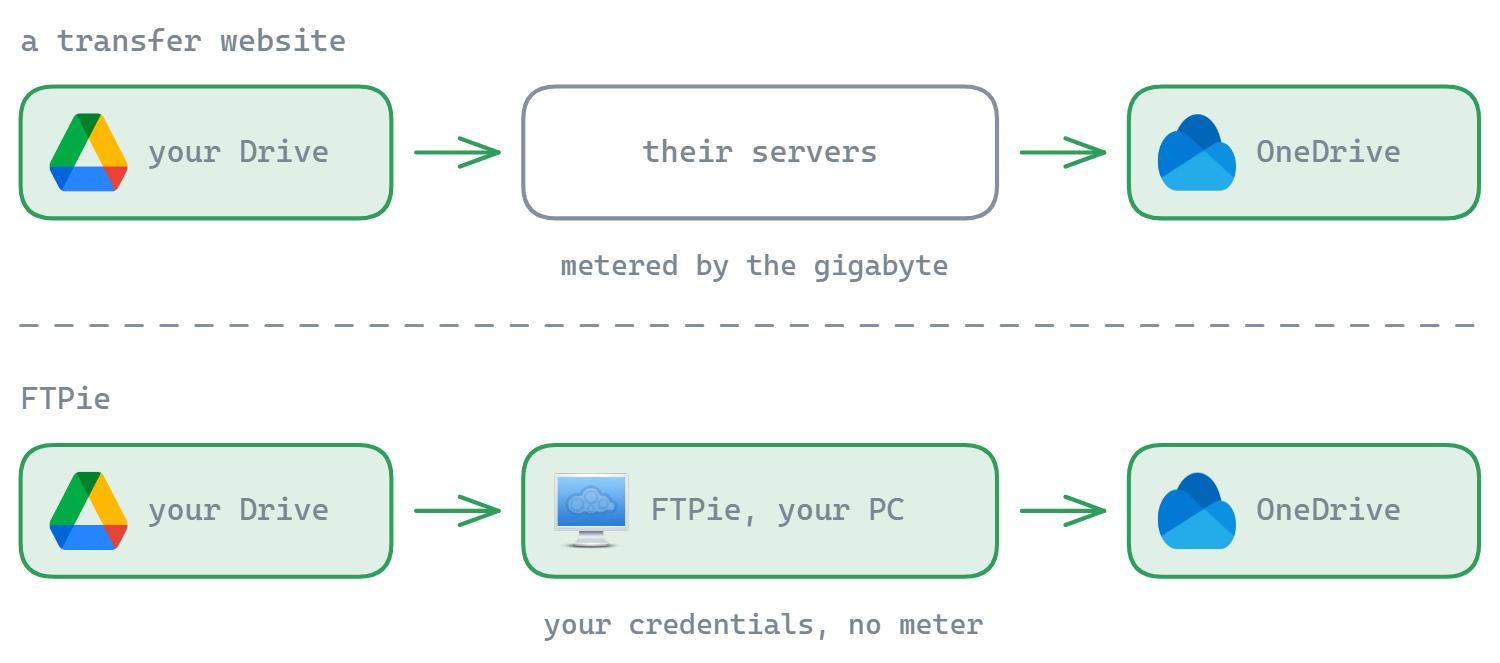
The downside is that everything goes through MultCloud's servers. Your cloud credentials are stored on their infrastructure, and your data transfers are routed through their network — which is where the bandwidth limits come in (more on that below). You also can't do anything offline or without an internet connection.

FTPie runs locally on your Windows PC. Your credentials stay on your machine, transfers happen directly between your computer and the storage services, and there's no middleman routing your data. The tradeoff is obvious: you need to install it, it only runs on Windows, and you can't access it from your phone.

For most people who work from a Windows desktop regularly, the desktop approach is more practical. For people who need access from multiple devices or don't want to install anything, the web approach has clear appeal.

The bandwidth cap: MultCloud's free tier reality

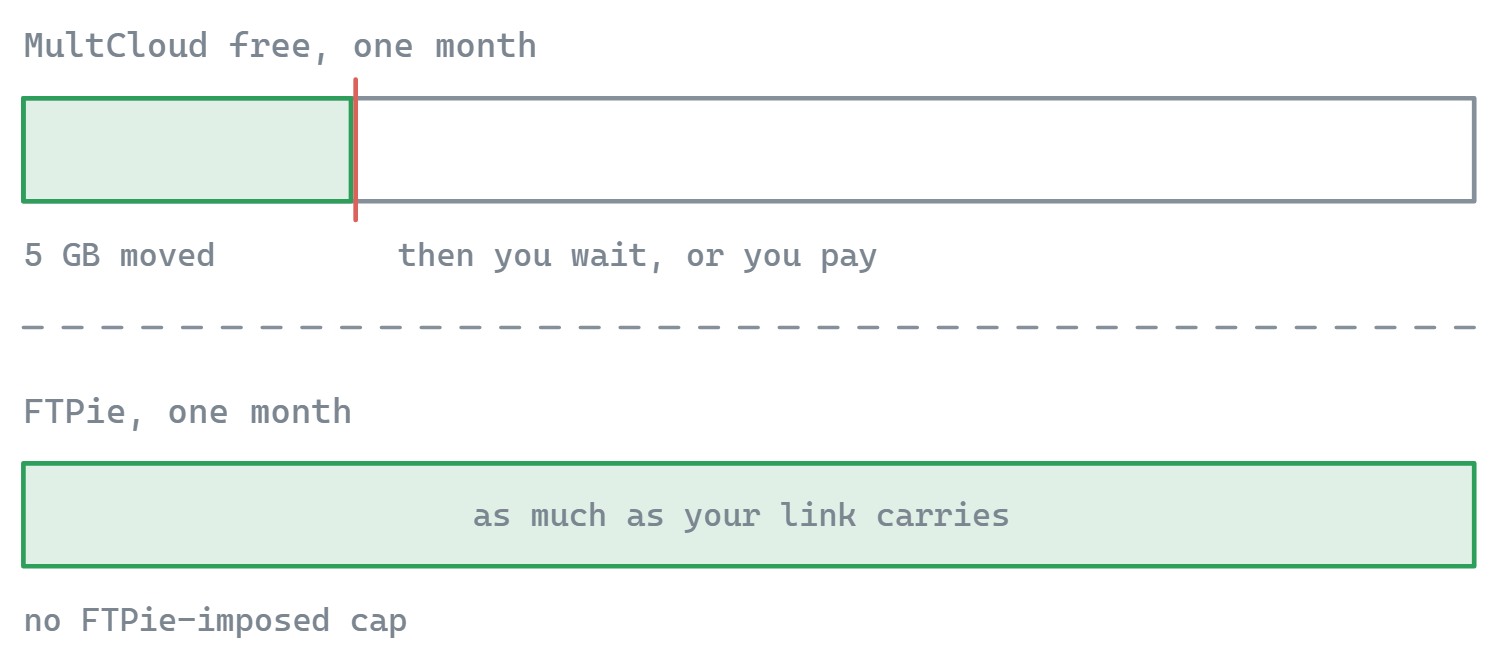
MultCloud's free plan gives you 5 GB of data transfer per month. That sounds like enough until you actually start moving files around. A few folders of photos, a website backup, a project archive — 5 GB goes fast. Once you hit the cap, you're done until next month or you pay.

MultCloud's paid plans start at around $9.99/month (or $59.99/year for the annual plan), and even those come with monthly transfer limits depending on the tier. It can get expensive if you're moving large amounts of data regularly.

FTPie doesn't have bandwidth caps. Transfers happen between your machine and the storage services directly, so there's no middleman metering your usage. You can move as much data as your internet connection allows. FTPie's free plan does have a limitation — it's restricted to one FTP/FTPS connection — but SFTP and cloud storage are unlimited, and there's no per-month data ceiling.

If you're only doing small, occasional cloud-to-cloud moves, MultCloud's free tier might be enough. If you regularly transfer large files or do backups, the bandwidth cap becomes the main bottleneck.

Cloud service coverage

This is where MultCloud shines. It supports over 30 cloud services — Google Drive, Dropbox, OneDrive, Box, pCloud, Mega, Amazon S3, Wasabi, Backblaze B2, Google Photos, iCloud, and many more. If you need to connect to an obscure or niche cloud service, MultCloud probably has it.

FTPie supports six consumer cloud services: Google Drive, Dropbox, OneDrive, pCloud, Box, and Mega. That covers the most popular ones, but it's a much shorter list. Enterprise object storage (S3, Azure, GCS) is on FTPie's roadmap but not available yet.

If your main task is migrating data between many different cloud services — say, moving everything from one provider to another — MultCloud's breadth is hard to match.

FTP support: full client vs. basic connection

MultCloud can connect to FTP servers, but it's a thin integration. It's designed primarily for cloud-to-cloud operations, and FTP is treated as just another endpoint. Don't expect the kind of control you'd get from a proper FTP client — things like configurable transfer modes, chunk-level pause/resume, or detailed error handling.

FTPie is, at its core, an FTP client. SFTP, FTPS, FTP, WebDAV — these are first-class protocols with parallel transfers, configurable chunk sizes, retry behavior with exponential backoff, and pause/resume that survives app restarts. If you work with FTP servers regularly, the difference in capability is significant.

If your workflow is mostly cloud-to-cloud with occasional FTP, MultCloud's basic FTP support might be fine. If FTP/SFTP is a core part of your work, it's not a real substitute for a dedicated client.

File management and built-in tools

MultCloud is focused on transferring and syncing — moving files between cloud accounts. It has a file browser, but it's single-panel and basic. There are no file viewers, no editors, no dual-pane management. You can't preview an image or edit a text file. It's a transfer orchestration tool, not a file manager.

FTPie is a full file manager with a dual-pane layout, plus built-in viewers (code, images, PDF, video/music), a backup scheduler with encryption, file compression, a notes tool, screenshot and screen recording tools, and Windows shell integration. Whether you need all of that depends on your workflow, but there's a lot more you can do without leaving the app.

Side-by-side comparison

Feature FTPie MultCloud
Desktop app
Works from any device (web)
FTP / FTPS / SFTP (full client) Partial
Cloud services supported630+
Server-to-server transfers
No bandwidth / data cap
Dual-pane file manager
Built-in file viewers/editors
Backup scheduling Partial
File compression
Windows shell integration
Credentials stay on your machine
No account required

Where MultCloud has the edge

  • 30+ cloud services. If you need to connect to niche or enterprise cloud providers, MultCloud's service list is much larger. It covers services FTPie doesn't support yet, including S3, Azure, Backblaze, iCloud, and Google Photos.
  • No installation. Open a browser, log in, and you're managing files. Works from any device, any operating system. If you need access from a machine where you can't install software, this matters.
  • Scheduled cloud-to-cloud sync. MultCloud can run server-side sync tasks on a schedule, even when your computer is off. Since FTPie runs locally, scheduled tasks only run while the app is open.
  • Access from anywhere. Phone, tablet, shared workstation — if it has a browser, you can use MultCloud. FTPie is tied to the Windows machine it's installed on.

Where FTPie has the edge

  • No bandwidth caps. Transfer as much data as you want. No monthly limits, no per-transfer restrictions. For anyone who regularly moves large files, this alone can be a dealbreaker for MultCloud.
  • Real FTP client. SFTP, FTPS, FTP, WebDAV with parallel transfers, pause/resume, chunk-level retry, and configurable timeout behavior. MultCloud's FTP support is basic by comparison.
  • Credentials stay local. Your cloud and server credentials never leave your machine. MultCloud stores them on their servers to perform transfers on your behalf — which is necessary for their architecture, but a privacy tradeoff.
  • Full file management. Dual-pane layout, built-in viewers and editors, backup scheduler with encryption, file compression, Windows shell integration. MultCloud is a transfer tool; FTPie is a file manager.
  • No account required. Download FTPie, install it, connect to your services. No sign-up, no email verification, no third-party account.

So which one should you pick?

These tools don't compete as much as they serve different scenarios.

MultCloud makes sense when you need to move data between many cloud services, want access from any device, or need background sync tasks that run even when your computer is off. Just be aware of the bandwidth limits on the free plan — 5 GB/month disappears quickly, and the paid plans add up.

FTPie makes sense when you work from a Windows PC and want a proper file manager that handles FTP and cloud storage together — with no bandwidth limits, no credentials stored on someone else's server, and a full set of built-in tools. Its free plan limits you to one FTP/FTPS connection, but SFTP and cloud transfers are unlimited with no data cap.

Some people might even use both — FTPie for daily file management and FTP work, MultCloud for the occasional migration between cloud services that FTPie doesn't support yet. They serve different enough purposes that they don't really conflict.

Start Your 14-Day Free Trial

Download FTPie and start your free 14-day trial. Enjoy seamless FTP + cloud integration and keep using the free version afterward.

Download Free Trial
CASA Verified & VirusTotal Scanned
14-day trial · Free version included
Windows 10 & 11