Comparison

FTPie vs RaiDrive

One mounts your storage as a Windows drive; the other gives you a real file manager. Here's the honest difference.

FTPie - FTP + cloud file manager with built-in tools vs RaiDrive - Free cloud & FTP drive mounter

RaiDrive is one of the most popular ways to get cloud and FTP storage into Windows Explorer. It is free for the common services, widely used, and does one thing well: it makes remote storage look like a local drive. So why compare it to FTPie at all? Because the two solve the same underlying problem - "I need to work with my remote files on Windows" - in very different ways.

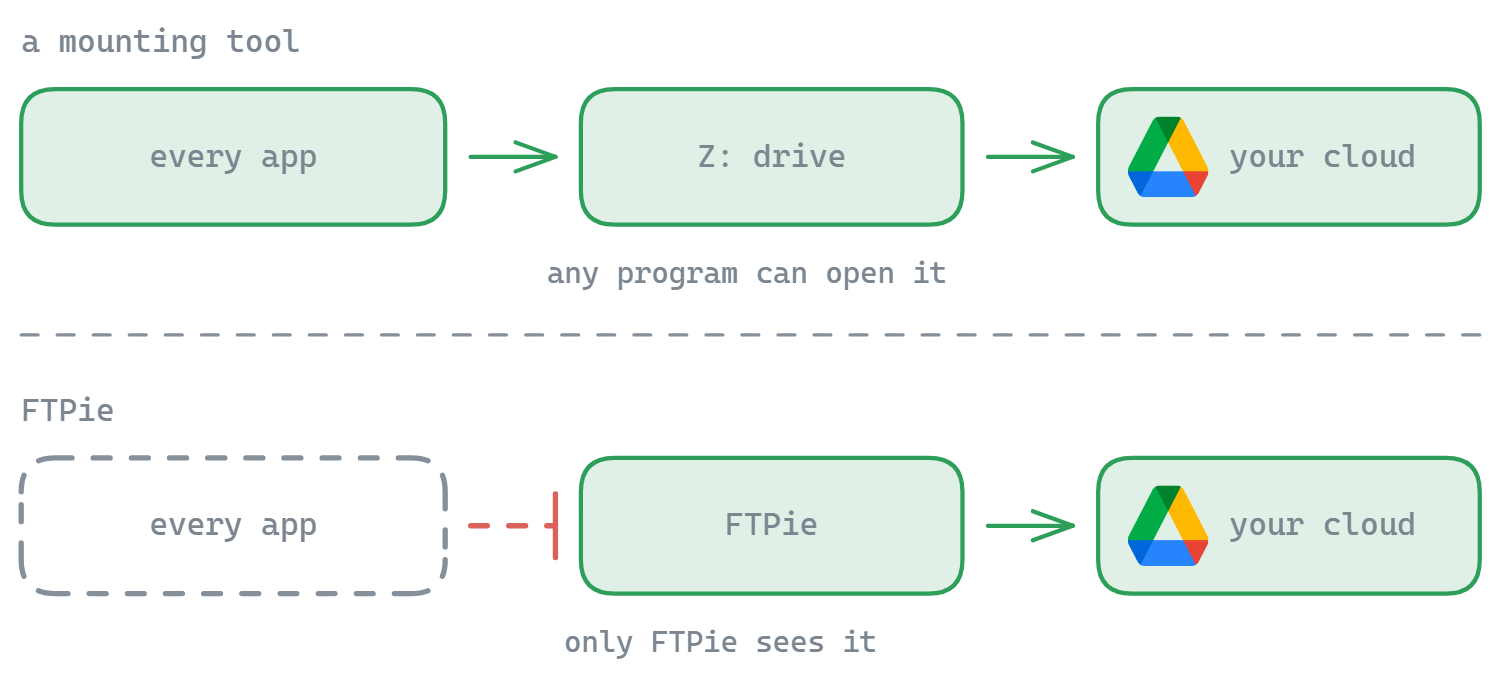
The short version: RaiDrive mounts; FTPie manages. If you want every app on your PC to see your cloud as drive Z:, RaiDrive is built for exactly that. If you want a dedicated workspace to browse, transfer, edit, back up and share across all your storage, that is FTPie.
How RaiDrive works

RaiDrive mounts your storage as a network drive. Connect Google Drive and it appears as a drive letter in Explorer; any application - Office, an IDE, a media player - can open and save files there as if they were local. It supports Google Drive, OneDrive, Dropbox, and FTP/SFTP/WebDAV, and the core mounting is free.

It is genuinely useful, and the price is hard to beat. The trade-offs: it is a mounting layer, not a file manager, so it does not help you organize or move files between services; some protocols and advanced options sit behind a paid tier; and because everything goes through a virtual drive, you are at the mercy of how well each app handles network latency.

How FTPie works

FTPie does not mount a drive letter. It is a dedicated Windows file manager: you open it, see all your storages, and work with them through a dual-pane interface with tabs, built-in viewers and editors, a backup scheduler, compression and sharing. That design lets it do things a pure drive-mounter cannot:

  • Dual-pane transfers between any two storages, including server-to-server
  • Built-in editors and viewers for code, images, PDFs, video and music
  • Scheduled backups with compression and encryption
  • Quick Share links and in-place file compression

The trade-off in the other direction is real: because FTPie does not mount a drive, other apps on your PC cannot open files directly from a drive letter - you work with them inside FTPie or via its open-in-external-app round-trip.

Side-by-side comparison

Feature FTPie RaiDrive
Mounts storage as a Windows drive
Files usable by any app via Explorer
FTP / FTPS / SFTP / WebDAV
Dual-pane file manager
Server-to-server transfers
Built-in viewers / editors
Backup scheduling
File compression in place
Free version Partial
One-time price (no subscription) Partial

Where RaiDrive has the edge

  • Drive mounting. The whole point - your storage appears as a drive letter, usable by every app on your system. FTPie does not do this.
  • Free for the basics. The core mounting of mainstream clouds is free, which is excellent value.
  • Transparent to other software. Open and save from any app as if the files were local.

Where FTPie has the edge

  • Actual file management. Organize and move files across storages in a dual-pane window - RaiDrive leaves that to you in Explorer.
  • Server-to-server transfers without routing everything through your PC.
  • Built-in tools. Editors, viewers, backup scheduler, compression, screenshot and sharing - RaiDrive has none of these.
  • One-time price. FTPie's paid plans are a one-time purchase rather than an ongoing subscription for advanced protocols.

So which should you pick?

If your main need is "make my cloud act like a local drive so any program can use it," RaiDrive is purpose-built for that and free to start - it is the better fit, and a great tool.

If you want a single place to browse, transfer, edit, back up and share across all your storage - with a one-time price instead of a subscription - FTPie is the better fit. As a RaiDrive alternative it trades drive-mounting for a real file-management workspace. The two can even coexist: RaiDrive for transparent app access, FTPie for active management.

Start Your 14-Day Free Trial

Download FTPie and start your free 14-day trial. Enjoy seamless FTP + cloud integration and keep using the free version afterward.

Download Free Trial
CASA Verified & VirusTotal Scanned
14-day trial · Free version included
Windows 10 & 11