FTP Client for Windows
A modern, genuinely free FTP & FTPS client for Windows - passive mode that works through firewalls, TLS encryption, and your clouds and NAS in the same window.
FTP is where file transfer started, and it's still how a huge share of web hosts, embedded devices, cameras, and legacy systems move files today. The clients, though, mostly froze in 2005: cluttered interfaces, cryptic connection errors, and no idea that your files might also live in a cloud account.
FTPie is a modern FTP client for Windows - plain FTP and FTPS with TLS, passive mode that actually works through firewalls - that also connects SFTP, WebDAV, NAS, and 10+ cloud services in the same dual-pane window.
How FTPie connects over FTP & FTPS
FTP and FTPS are native, built-in protocols in FTPie:
- Add a new storage and choose FTP or FTPS.
- Enter the host, port, and credentials - passive mode is on by default, so it works behind routers and firewalls without port forwarding.
- For FTPS, pick explicit (AUTH TLS, port 21) or implicit (port 990); FTPie validates the server's certificate on connect.
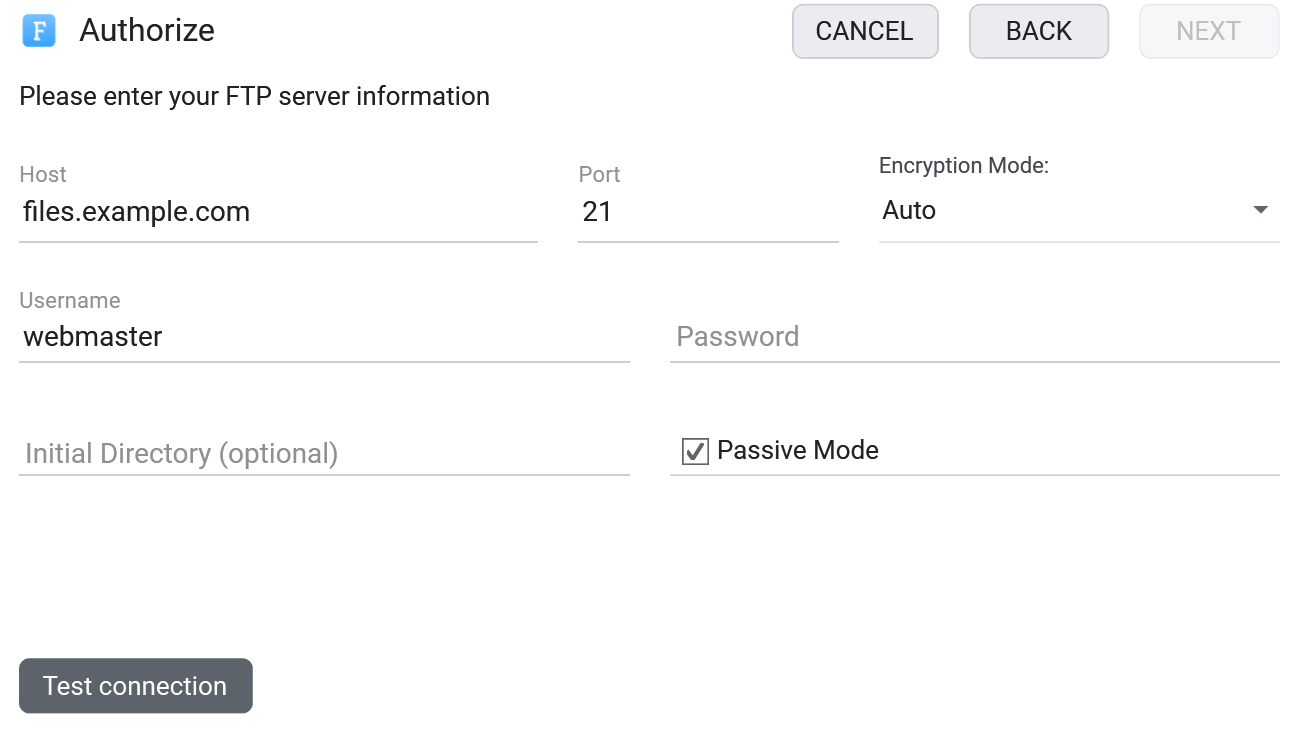
Not sure the server is reachable in the first place? Pre-check it in the browser with the free FTP connection tester.
What you can do
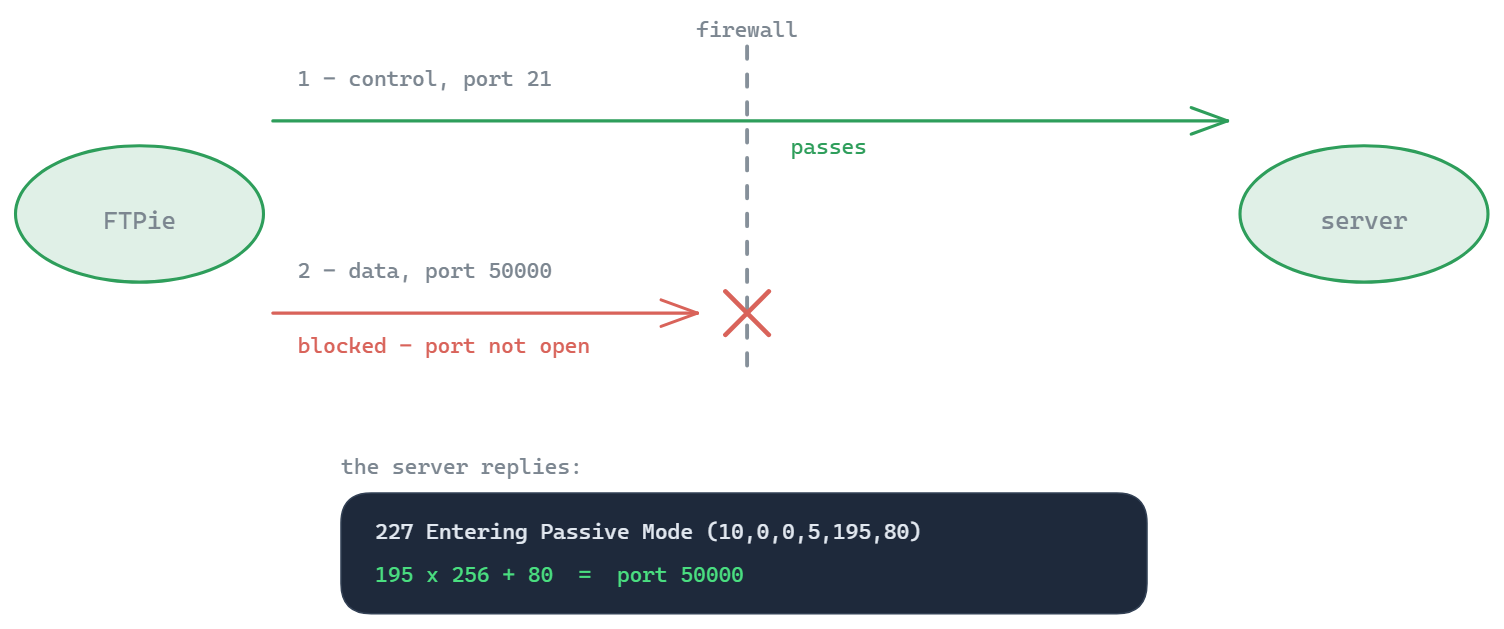
- Passive-mode transfers that work through NAT and firewalls - no more listings that hang forever
- Full FTPS support - explicit and implicit TLS with certificate validation
- Resumable transfers with a managed queue - interrupted downloads pick up where they stopped
- Edit remote files in place with built-in text, code, image and document editors - no download/re-upload cycle
- Zip and unzip on the server with integrated compression
- Move files between FTP and cloud - drag from a server pane straight into Google Drive, OneDrive, or Dropbox
A genuinely free FTP client - not a trial
FTPie's free plan covers up to 3 FTP/FTPS/SFTP connections on one device, permanently. The transfer queue, viewers, and editors are included - the paid plans add cloud storage, WebDAV, NAS, and the Pro tool set, not basic FTP. If you've been paying for a legacy client or fighting a free one, see how FTPie compares to FileZilla, WinSCP, and SmartFTP.
An FTPS client with proper TLS
If your host mandates encrypted transfers, FTPie works as a dedicated FTPS client: explicit AUTH TLS upgrades on the standard port, implicit TLS on 990, and certificate checks so a misconfigured or impersonated server gets caught instead of trusted. You can inspect a server's certificate chain and TLS versions beforehand with the FTPS certificate checker and TLS protocol scanner. Unsure whether you need FTPS or SFTP? The differences are smaller than the names suggest - our guide to FTP vs SFTP vs FTPS settles it in five minutes.
Free tools for FTP
Diagnosing a server? FTPie publishes free, no-signup tools: the FTP connection tester, port checker, passive port range checker, and a complete FTP command reference.
Common questions
Yes - and the free plan is not a trial. Up to 3 FTP/FTPS/SFTP connections on one device, free permanently, including the transfer queue and built-in viewers. Paid plans add cloud storage, WebDAV, NAS, and the Pro tool set - not basic FTP. See the plan comparison.
Yes, both variants: explicit FTPS (AUTH TLS on port 21, the modern standard) and implicit FTPS (port 990). Server certificates are validated so you know you're talking to the right host.
Passive mode by default, which is what works through home routers, NAT, and corporate firewalls. Active mode is available for the rare server that requires it.
Plain FTP sends credentials and files unencrypted, so treat it as safe only on trusted networks or for genuinely public data. Whenever the server supports it, connect with FTPS or SFTP instead - FTPie speaks all three, so switching is a dropdown, not a new app.
FileZilla is a solid classic FTP client. FTPie covers the same FTP/FTPS/SFTP ground and also connects Google Drive, OneDrive, Dropbox, WebDAV, and NAS in the same dual-pane window - with built-in editors, zip on the server, and scheduled transfers in Pro. See FTPie vs FileZilla for the honest breakdown.
Yes - FTPie is built for Windows 10 and 11. Download, install, and the free plan works immediately; no account required to connect your first server.
Related
- All integrations
- SFTP client for Windows
- FTP vs SFTP vs FTPS - the differences explained
- FTP from the command line on Windows
- FTPie vs FileZilla
- Test an FTP connection online
Start Your 30-Day Free Trial
Download FTPie and start your free 30-day trial. Enjoy seamless FTP + cloud integration and keep using the free version afterward.
Download Free Trial