FTP Passive Port Range Checker
Verify that your FTP server’s passive mode port range is open and reachable through firewalls. Essential for diagnosing “unable to open data connection” errors.
What is passive mode?
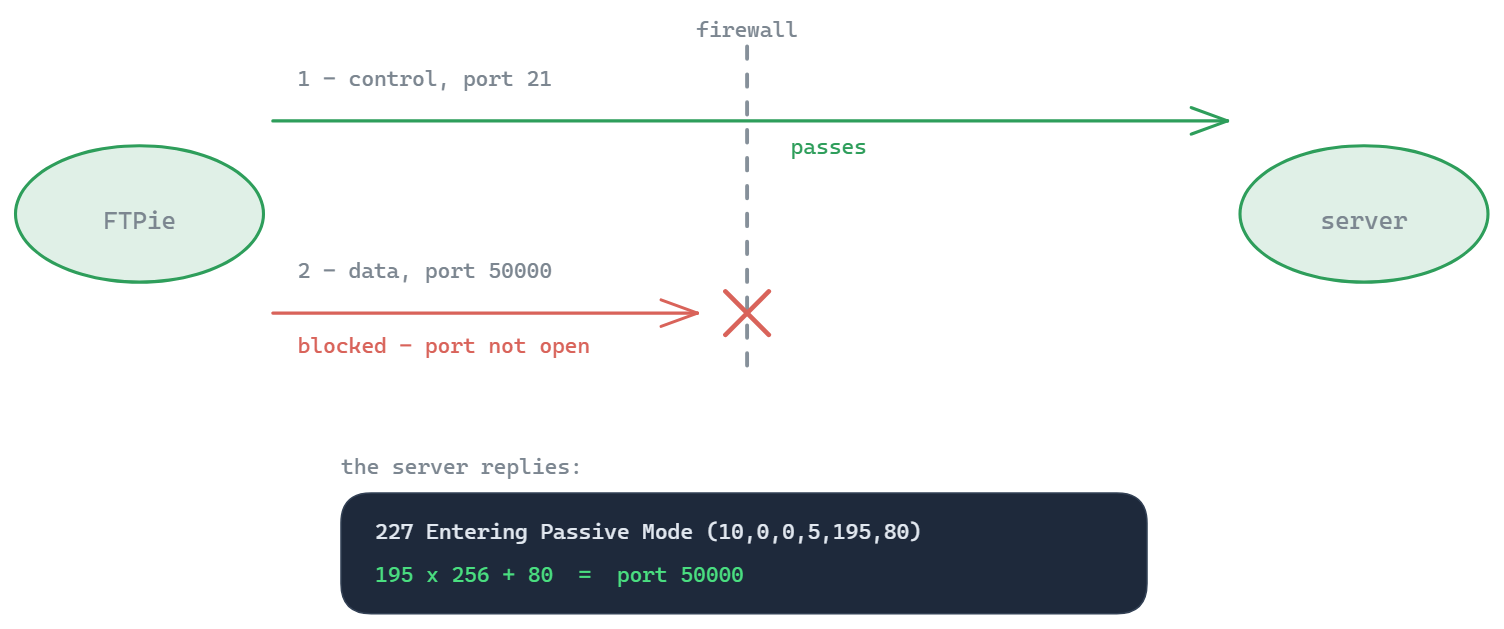
In FTP passive mode (PASV), the server opens a random high-numbered port for data transfers and tells the client which port to connect to. If these ports are blocked by a firewall, file transfers will fail even though the control connection on port 21 works fine.
Common passive port ranges
| Range | Used by |
|---|---|
| 49152–65535 | IANA dynamic/ephemeral range (default on many servers) |
| 40000–40100 | Common custom range (cPanel, Plesk) |
| 30000–31000 | Common custom range (FileZilla Server default) |
Active vs passive mode
FTP uses two connections: a control connection on port 21 for commands, and a separate data connection for every file transfer and every directory listing. The mode decides which side opens that second connection.
| Active mode (PORT) | Passive mode (PASV) | |
|---|---|---|
| Who opens the data connection | The server, back to the client | The client, to the server |
| What the client sends | PORT (or EPRT) with its own address and port | PASV (or EPSV) |
| What has to be reachable | A port on the client - which home routers and company firewalls block | The server's passive port range |
| Who uses it | Windows' built-in ftp.exe, old scripts | Almost every modern client, by default |
Passive mode needs only outgoing connections from the client, which is why it works behind NAT and why modern clients default to it. The work moves to the server: its firewall has to let clients in on the whole passive range, not just on port 21.
Reading the 227 reply
The server answers PASV with six numbers, for example 227 Entering Passive Mode (203,0,113,10,195,80). The first four are the IP address to connect to. The last two are the port: 195 x 256 + 80 = 50000. Two things commonly go wrong:
- The port is outside the range the firewall allows. Set the server's passive range to the range you opened, or open the range the server actually uses.
- The address is a private one, such as 192.168.1.10, because the server sits behind NAT and announces its internal address. Clients then hang on every directory listing. Tell the server its public address with the settings below; some clients work around it by reusing the server's address, but the fix belongs on the server.
With EPSV the reply is 229 Entering Extended Passive Mode (|||50000|): only the port, no address, so the private-address problem disappears. The port still has to be open.
Setting the passive range on common servers
- vsftpd - in vsftpd.conf:
pasv_min_port=40000,pasv_max_port=40100, andpasv_addressset to the public IP when the server is behind NAT. - ProFTPD -
PassivePorts 40000 40100, plusMasqueradeAddressfor the public address. - Pure-FTPd -
PassivePortRange 40000 40100andForcePassiveIP. - FileZilla Server - its passive mode settings take a custom port range and the public IP to report.
- IIS - FTP Firewall Support at server level: Data Channel Port Range and External IP Address of Firewall. You may need to restart the FTP service for a new range to apply.
Then open the same range for TCP everywhere in front of the server - the operating system firewall, a cloud security group, a router's port forwarding - and scan a few ports from it with the checker above.
How to read the result
Open means a TCP connection to that port was accepted from the internet, so nothing on the way blocks it. No response usually means a firewall silently dropped the attempt. Closed means something answered with a refusal - often the server itself, because many FTP servers only listen on a passive port for a moment after a client sends PASV.
So on an idle server, closed ports in the range are normal; a whole range of no responses is the real warning sign. The final proof is a directory listing in passive mode from a real client: if login works and the listing then hangs, the data connection is the one being blocked. The FTP connection tester checks the first half - that the server answers and accepts your login.