Comparison

FTPie vs Gyazo

Instant capture links either way - the difference is whose servers your images live on.

FTPie - Capture & share from storage you own vs Gyazo - Hosted screenshot & capture service

Updated July 2026

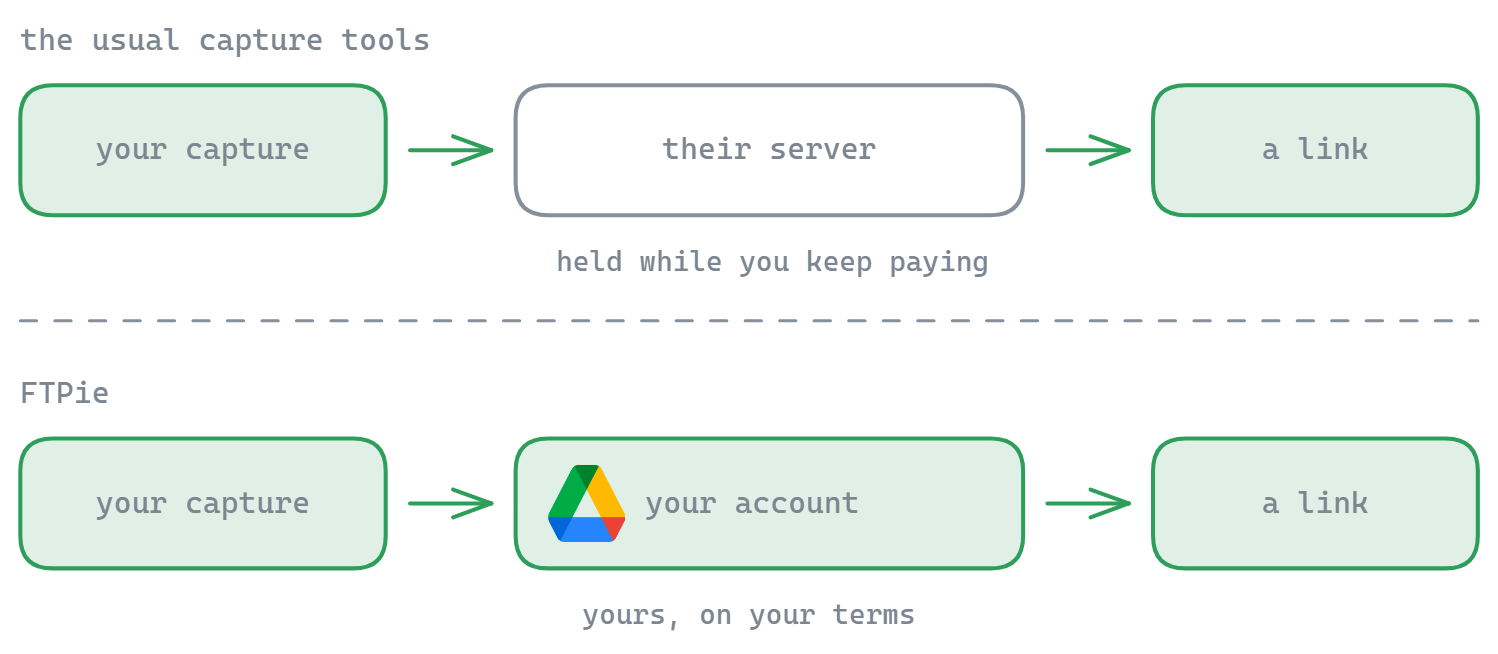
Gyazo nailed the instant-capture experience: grab a region, and a link to the image is on your clipboard a second later. It is fast and frictionless, which is exactly why people love it. The same model powers Zight (formerly CloudApp), Droplr and similar tools.

The trade-off is custody and cost. With Gyazo, your captures live on Gyazo's servers, and the genuinely useful parts - history, search, longer retention - sit behind a subscription. FTPie offers the same one-second capture-to-link flow, but the link points at a cloud account you own, for a one-time price.
Where Gyazo has the edge

Gyazo is honestly very good at its one thing. Its capture-to-link flow is instant, it works across Windows and Mac, and its hosted nature means a recipient just clicks a link - no thinking about where the file lives. The paid tiers add a searchable history, GIF capture and longer retention. If you want a zero-setup hosted service and do not mind the subscription, Gyazo is a fine choice.

Where FTPie has the edge

FTPie's screenshot tool captures and annotates, then Quick Share returns a link from a cloud account you control - and the screen recorder works the same way for video. Because the file lives on your storage, you keep it, you can delete it, and there is no third party retaining your captures or expiring them when a plan lapses. And it is one feature of a full file manager - the same app handles your cloud, FTP, backups and transfers - for a one-time price rather than a recurring fee.

Side-by-side comparison

Feature FTPie Gyazo
Instant capture-to-link
Files hosted on storage you own
No subscription (one-time price)
Hosted history & search
Screen recording included Partial
Full file manager (cloud + FTP)
Cross-platform (Mac)

Pricing compared (2026)

Gyazo's free tier keeps only your most recent captures; the searchable history, GIF capture and longer retention require Gyazo Pro on subscription. FTPie's model:

  • FTPie Free - up to 3 FTP/FTPS/SFTP connections, free forever
  • FTPie Pro - $9/month or $59/year - cloud accounts, capture tools and the rest of the app
  • Lifetime - a one-time license (currently $99 founder pricing), no recurring cost

The practical difference: with Gyazo you rent access to your own screenshot history; with FTPie the captures sit in your cloud account and the license can be one-time - see the plan comparison.

Switching from Gyazo to FTPie

  • Connect a cloud account (Google Drive, Dropbox, OneDrive...) - that becomes where your captures live.
  • Same one-second flow. Hotkey, capture, annotate if you like - the share link is on your clipboard, pointing at your storage.
  • Your history is your folder. Captures accumulate in a normal cloud folder you can browse, organize, back up or delete - no retention limits, no plan-lapse expiry.

Try it with the free version or the 14-day Pro trial.

So which should you pick?

If you want the simplest possible hosted capture service, with a searchable history and nothing to manage, Gyazo (or Zight/Droplr) is purpose-built for that. Pick it if hosted convenience matters more than ownership.

If you would rather your captures live on storage you control, pay once instead of monthly, and have screenshots and recordings inside the same app you use for your cloud and FTP files, FTPie is the better fit. As a Gyazo alternative it puts ownership and a one-time price first.

Common questions

Is FTPie a good Gyazo alternative?

Yes, if ownership matters to you - FTPie gives the same capture-to-link flow but the image lives in a cloud account you control, with a one-time license option instead of a subscription. If you want a hosted service with searchable history and zero setup, Gyazo keeps that convenience.

Where do FTPie screenshots get uploaded?

To whichever of your connected storage accounts you choose - Google Drive, Dropbox, OneDrive, an FTP server, or any other supported service. The share link points at your storage; FTPie never hosts your files.

Does Gyazo delete old screenshots?

On the free tier only your most recent captures remain accessible; older ones need Gyazo Pro. Captures in FTPie are ordinary files in your own folder - nothing expires.

Can FTPie record my screen like Gyazo Pro?

Yes - the screen recorder captures video with the same share-from-your-own-storage flow, included rather than gated behind a higher tier.

Start Your 14-Day Free Trial

Download FTPie and start your free 14-day trial. Enjoy seamless FTP + cloud integration and keep using the free version afterward.

Download Free Trial
CASA Verified & VirusTotal Scanned
14-day trial · Free version included
Windows 10 & 11