Comparison

FTPie vs Loom

A polished hosted video platform versus self-hosted recording links you own. They aim at different needs.

FTPie - Screen recording shared from your own storage vs Loom - Hosted screen recording & video messaging

Updated July 2026

Loom turned the quick screen recording into a workplace habit, and it is genuinely good at it: record, and a hosted link with a viewer, reactions and analytics is ready to send. If your team runs on async video, Loom is built for exactly that.

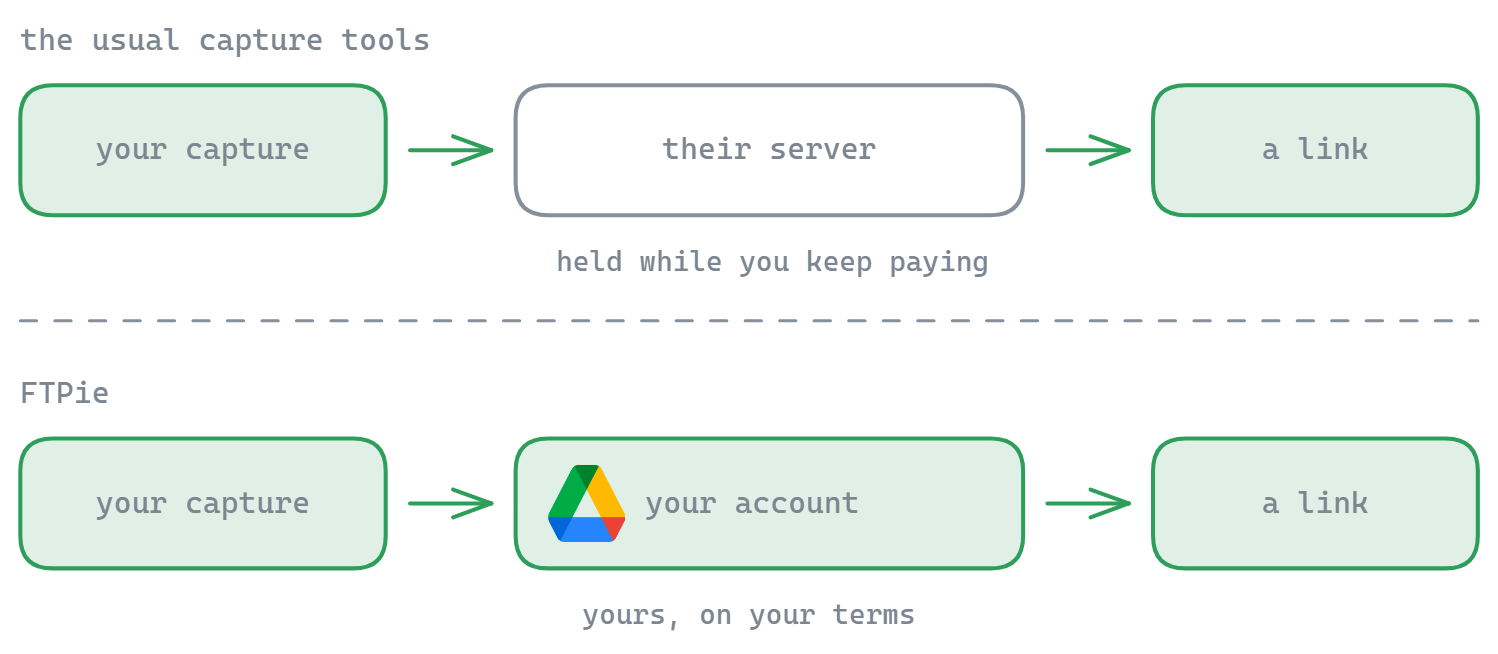
FTPie is not trying to be a video platform. It is a file manager with a screen recorder built in, and its angle is ownership: the recording stays on your machine, and when you share it the link comes from a cloud account you control - for a one-time price, with no third party hosting your videos. Be clear-eyed about the trade: you give up Loom's team and viewer features to get that.
Where Loom has the edge

Loom does things a file manager simply does not: automatic transcription and captions, a hosted player with view counts and reactions, viewer analytics, comments, workspaces and team libraries, instant CDN-backed playback, and webcam-bubble recording. For team communication and polished, trackable video messages, Loom is the stronger product and we will not pretend FTPie matches it there.

Where FTPie has the edge

FTPie's strength is ownership and simplicity. Recordings save locally and share via Quick Share as a link on storage you own - nothing lives on a vendor's servers, links do not die when a subscription lapses, and there is no per-seat fee. It is a one-time purchase, and the recorder sits inside the same app you use to manage your cloud and FTP files. For quick demos, bug reports and handoffs where you would rather not hand your video to a third party, that is the more private, cheaper path.

Side-by-side comparison

Feature FTPie Loom
Screen recording with shareable link
Recordings hosted on storage you own
No subscription (one-time price)
Transcription & captions
Hosted player, analytics & comments
Team workspaces / video library
Full file manager (cloud + FTP)

Pricing compared (2026)

Loom's free tier caps recording length and video count; the useful team features sit in paid per-seat subscriptions. FTPie's model:

  • FTPie Free - up to 3 FTP/FTPS/SFTP connections, free forever
  • FTPie Pro - $9/month or $59/year - includes the screen recorder, capture tools and the full app
  • Lifetime - a one-time license (currently $99 founder pricing), no per-seat fees, no recurring cost

For a solo dev or a small team recording demos and bug reports, one lifetime license versus a per-seat subscription is the practical difference - see the plan comparison.

Switching from Loom to FTPie

  • Connect a cloud account - that's where recordings will live, in a normal folder you control.
  • Record and share the same way. Capture the screen, get a link via Quick Share, send it - recipients just click.
  • Nothing expires. No video-count caps, no links dying with a lapsed plan, no per-seat math.
  • Know what you're giving up: transcription, the hosted player, analytics and team libraries stay with Loom - if those drive your workflow, keep it.

Try it with the free version or the 14-day Pro trial.

So which should you pick?

If you need transcription, a hosted player, viewer analytics and team libraries - the full async-video workflow - Loom is the right tool and FTPie is not a substitute for it. Pick Loom when the video platform is the point.

If you mostly record quick demos and bug reports and would rather keep the files on storage you own, skip the subscription, and share from the same app that manages your cloud and FTP, FTPie is the leaner, more private option. As a self-hosted Loom alternative it prioritizes ownership and a one-time price over hosted team features.

Common questions

Is FTPie a good Loom alternative?

For quick demos, bug reports and handoffs where you'd rather own the file and skip the subscription - yes. For team video workflows with transcription, analytics and shared libraries, Loom is the purpose-built tool and FTPie doesn't replace it.

Is there a free Loom alternative without video limits?

FTPie's recordings are ordinary files on your own storage, so there's no video-count cap or expiry by design. The recorder is part of the Pro tool set; recordings save locally and share from your connected accounts.

Where do FTPie screen recordings get stored?

Locally on your PC, and - when you share - on whichever of your connected storage accounts you choose (Google Drive, Dropbox, an FTP server, etc.). The share link points at your storage, not a vendor's servers.

Does FTPie record webcam and transcribe like Loom?

No - there's no webcam bubble, transcription or hosted viewer analytics. FTPie records the screen and shares from your own storage; the trade is ownership and a one-time price versus Loom's hosted feature set.

Start Your 14-Day Free Trial

Download FTPie and start your free 14-day trial. Enjoy seamless FTP + cloud integration and keep using the free version afterward.

Download Free Trial
CASA Verified & VirusTotal Scanned
14-day trial · Free version included
Windows 10 & 11