FTP, SFTP, and FTPS look like three flavors of the same thing, and the names actively encourage the confusion. In reality one of them is a 1970s protocol that sends passwords in plain text, one is that same protocol wrapped in TLS, and one is a completely different protocol that just borrowed the letters. If a hosting panel or a NAS setup screen is asking you to pick, here's what each choice actually means.
The short answer: if the server supports it, use SFTP. It encrypts everything, needs only one port, and works cleanly through firewalls. Use FTPS when you're tied to FTP-based infrastructure that added TLS. Use plain FTP only for public, non-sensitive downloads - or not at all.
FTP: the original, and unencrypted
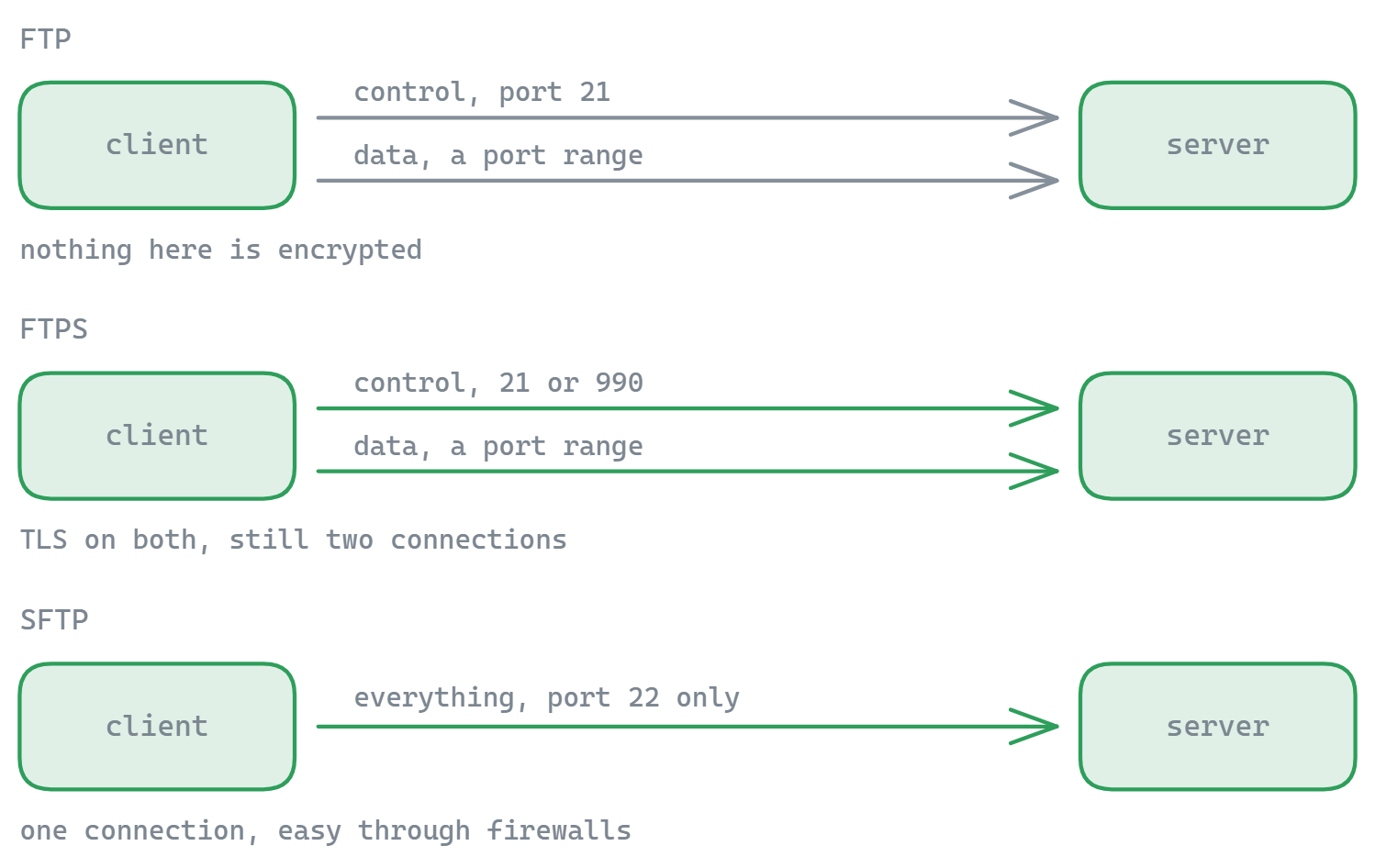
FTP (File Transfer Protocol) dates back to the earliest days of the internet and works over two channels: a control connection on port 21 for commands, and a separate data connection for each file transfer or directory listing. Nothing is encrypted - your username, password, and file contents all cross the network readable by anyone in a position to look.
The two-connection design also causes FTP's infamous firewall problems. In active mode the server connects back to the client (usually blocked); in passive mode the client opens a second connection to a random high port on the server (blocked unless the server's firewall opens the passive range). If you've ever logged in fine and then watched a directory listing hang forever, that's this - our look at where FTP still fits in 2026 covers why it survives anyway.
FTPS: FTP with TLS bolted on
FTPS is regular FTP upgraded with TLS encryption - the same technology that puts the padlock in your browser. It comes in two variants: explicit FTPS, where the client connects to the normal port 21 and upgrades the session with an AUTH TLS command (this is the standard, defined in RFC 4217), and implicit FTPS, an older convention where the connection is encrypted from the first byte on port 990.
The server proves its identity with a TLS certificate, exactly like a website. What FTPS does not fix is the two-connection architecture - data still flows over separate connections, so the passive-port firewall dance remains, made trickier because firewalls can no longer peek inside the (now encrypted) control channel to open data ports automatically.
SFTP: not FTP at all
SFTP (SSH File Transfer Protocol) shares four letters with the others and nothing else. It's a file transfer protocol built on top of SSH - the same secure channel administrators use for remote terminals. Everything - authentication, commands, file data - travels encrypted inside one SSH connection on port 22.
That single-connection design is why SFTP is so trouble-free through firewalls and NAT: one port open, done. Authentication can use a password or, better, SSH keys, which is what makes SFTP the default choice for automated deployments and scripted transfers. Instead of a certificate, the server proves its identity with a host key whose fingerprint your client remembers - and warns you if it ever changes.
Side-by-side comparison
| FTP | FTPS | SFTP | |
|---|---|---|---|
| Built on | Plain TCP | FTP + TLS | SSH |
| Default port | 21 (+ data ports) | 21 explicit / 990 implicit (+ data ports) | 22 only |
| Encryption | None | TLS on control and/or data channel | Everything, always |
| Server identity | - | TLS certificate | SSH host key |
| Auth options | Password, anonymous | Password, client certificates | Password, SSH keys |
| Firewall/NAT | Troublesome (passive port range) | Most troublesome (encrypted control + port range) | Easy (single connection) |
| Typical home | Legacy servers, public mirrors | Enterprise FTP infrastructure, compliance mandates | Web hosting, VPS, NAS, deployments |
Which one should you use?
- You have a choice: SFTP. Strongest default, simplest networking, key-based automation.
- Your host or appliance only speaks FTP/FTPS: FTPS, explicit mode, and make sure the certificate is valid. Plain FTP only if the data is genuinely public.
- You're automating: SFTP with SSH keys - no passwords in scripts. (On Windows, note that the built-in
ftp.exespeaks neither SFTP nor FTPS - see our command-line FTP guide for its limits.) - Compliance requires "FTPS": some payment and healthcare frameworks name FTPS explicitly; otherwise both FTPS and SFTP satisfy encryption-in-transit requirements.
Not sure what a server actually supports? Point our free testers at it: the FTP, SFTP, and FTPS connection testers run a real handshake from your browser, and the TLS Protocol Scanner shows which TLS versions an FTPS server negotiates.
Or skip the choice entirely
The practical annoyance with three protocols is needing to care which one each server speaks. A modern client makes the difference invisible: FTPie connects to FTP and FTPS as well as SFTP servers (plus WebDAV and 10+ cloud services) in the same window, handles passive mode and host-key verification for you, and its free plan covers up to 3 server connections - enough to stop thinking about acronyms and just move files.
Working from the terminal instead? Keep the command references handy: FTP commands and SFTP commands, both with syntax and examples.
Start Your 30-Day Free Trial
Download FTPie and start your free 30-day trial. Enjoy seamless FTP + cloud integration and keep using the free version afterward.
Download Free Trial