Managing files across FTP servers and cloud storage often involves multiple manual steps - downloading files, compressing them locally, and uploading them back again. It works, but it is slow, repetitive, and easy to mess up. FTPie simplifies this workflow by letting you create zip archives directly from remote storage in just a few clicks.
While the process is fully automated from the user’s perspective, it is worth noting that compression still technically requires downloading files temporarily. FTPie handles this seamlessly in the background - it automatically downloads the necessary data, creates the archive locally, and uploads the finished zip back to the same location. No manual downloads, no extra steps, and no interruptions to your workflow. Combined with smooth file transfers, compression becomes a natural part of everyday remote file management.
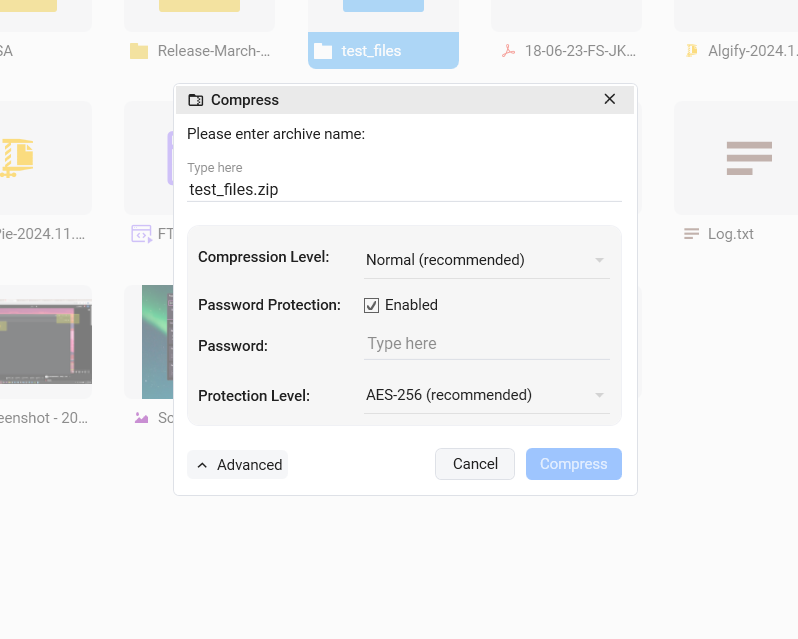
Zip Files Directly from Remote Storage
With Integrated Compression, you can create zip archives from any FTP or cloud storage just like you would with local files. Simply right-click any file or folder, choose Compress, and configure your archive settings. FTPie takes care of the rest automatically.
The archive is created and uploaded back to the same folder, ready to use immediately. This smooth workflow removes the need for switching between tools and significantly reduces the time required to bundle files together. Once created, archives can be opened instantly using FTPie’s built-in archive viewer without leaving the application.
Password Protection and Encryption
Security is built into the compression process. FTPie supports multiple encryption options, ranging from simple password protection to strong AES-256 encryption. This allows you to protect sensitive data before storing it on remote servers or sharing it with others.
Encrypted archives work perfectly alongside features like Quick Share, making it easy to securely distribute protected files, or with Auto Backups when archiving important data for long-term storage.
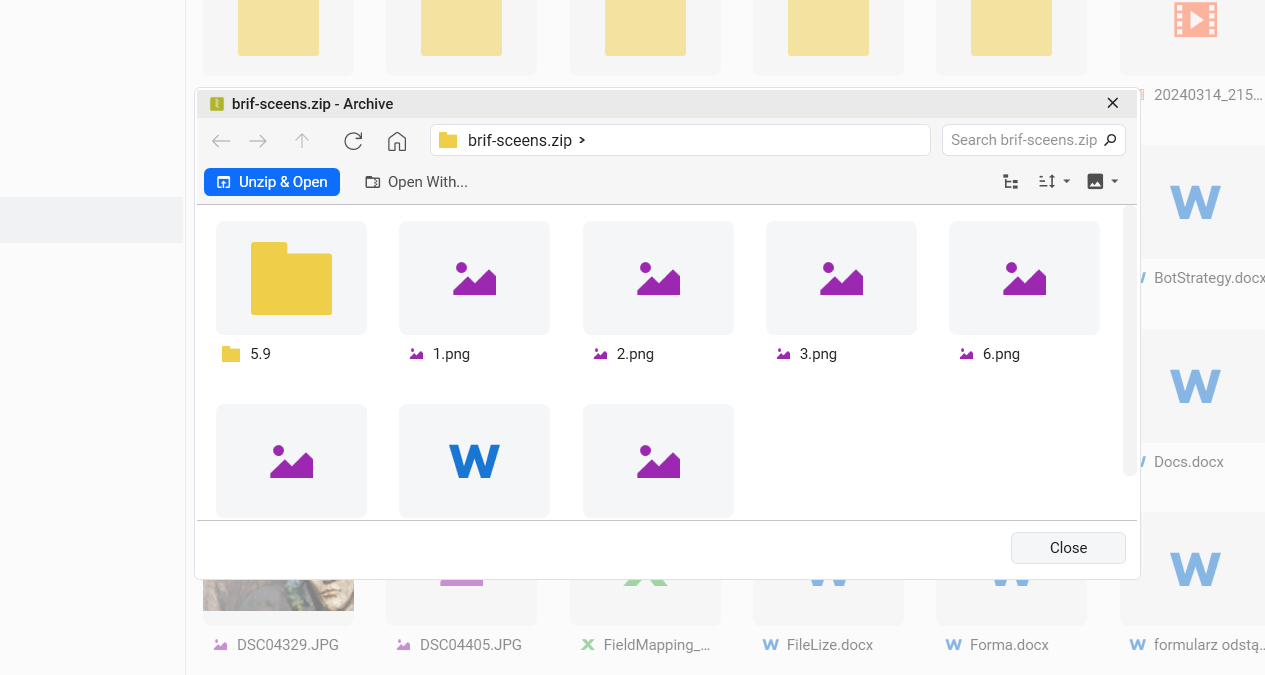
Smart Archive Preview Without Full Download
Opening large archives just to check their contents can waste time and bandwidth. FTPie solves this with Smart Archive Preview, which downloads only a small portion of the archive (approximately the first megabyte) to display its structure instantly.
You can quickly inspect what is inside and decide what to do next without downloading the entire file. This makes it easy to verify archives, locate specific files, or confirm contents before extracting - especially useful when working across multiple remote locations or shared environments.
Flexible Workflow Options
After previewing an archive, FTPie lets you choose how to proceed depending on your needs:
- Unzip & Open - downloads and extracts the archive for full access to files, ideal for editing, processing, or working with documents using Document Editing.
- Remove & Close - cleans up temporary files and closes the preview, perfect for quick inspections while keeping local storage usage minimal.
Why This Matters
Traditional FTP clients usually require manual download, compression, and re-upload, turning a simple task into a multi-step process. FTPie streamlines everything into a single smooth action performed directly from remote storage, saving time and reducing friction.
Integrated Compression is useful for bundling files for sharing, archiving old projects, protecting sensitive documents, or optimizing storage space. With customizable compression levels, built-in encryption, and automatic handling of the entire process, it becomes a natural part of everyday file management rather than an extra task.
If you have not tried it yet, Integrated Compression is available in FTPie, including the free version (up to 3 FTP/FTPS/SFTP connections) - making it easy to experience a faster and smoother way to manage remote files.
Looking for more ways to work with remote files without downloading them? See how FTPie handles editing remote files directly.