Comparison

FTPie vs Cryptomator

Two different encryption models - vaults you mount vs files you seal

FTPie - Per-file encryption inside a multi-storage file manager vs Cryptomator - Open-source vault encryption for cloud folders

Updated July 2026

Cryptomator and FTPie both exist so that your cloud provider can't read your files - but they get there by very different routes, and for some people the honest answer is "use Cryptomator, it's free." Here's how the two models actually differ, so you can pick the one that matches how you work.

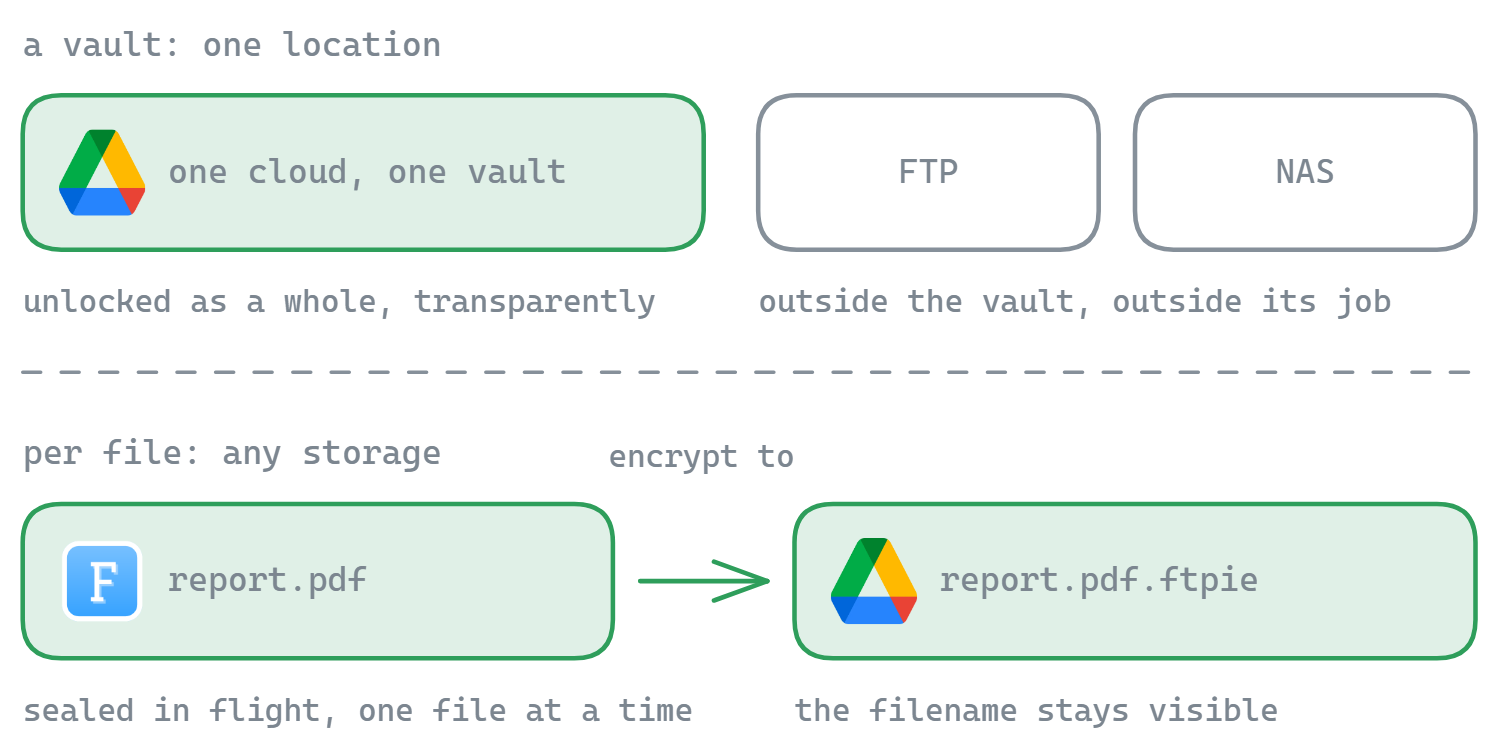
Cryptomator creates an encrypted vault - a folder of scrambled files that lives inside your Dropbox, Google Drive, or OneDrive sync folder. Unlock the vault with your password and it appears as a virtual drive; everything you drop into it is encrypted transparently, filenames included. Your cloud's sync client uploads only ciphertext.

FTPie is a file manager for cloud, FTP, SFTP, WebDAV, and NAS that includes per-file AES-256 encryption in its transfer layer. You encrypt specific files or folders on demand - locally or on any connected storage - and they're sealed as individual .ftpie files anyone can decrypt with the password in the free version of FTPie.
The vault approach: Cryptomator's superpower

Cryptomator's model is "encrypt everything in this place, transparently." Once a vault is unlocked, you work with your files normally - open, edit, save - and the encryption is invisible. Lock the vault and there's nothing readable left, not even the filenames, which are individually encrypted. The format is open source and independently audited, and the desktop app is free (pay-what-you-want).

The natural fit: you use your cloud's official sync client, you want a private area inside it, and you mostly access those files from your own devices. Mobile apps (paid) and third-party support (Cyberduck and Mountain Duck can open Cryptomator vaults) round out the ecosystem.

The limits come from the same design: a vault protects one location and assumes something else moves the bits - normally the cloud's sync app. There's no FTP/SFTP story without pairing it with another tool, no per-file "send this encrypted file to a colleague" flow (recipients need vault access, not just one file), and no transfers, backups, or file management - it's an encryption layer, not a file tool.

The per-file approach: FTPie's territory

FTPie treats encryption as something you do to files, wherever they live. Right-click → Encryption → Encrypt here (or Encrypt to… any other storage), set a password, and the file is sealed with AES-256 before it travels - the key is derived on your PC and never leaves it. It works identically on a local folder, an FTP server, a NAS share, or a Google Drive - no sync client involved, because FTPie talks to each storage directly.

  • Any storage, not one vault location - encrypt on FTP, SFTP, WebDAV, NAS, and 10+ clouds
  • Encrypt in motion - "Encrypt to" streams a file from any source to any destination, encrypting on the fly (even cloud-to-cloud)
  • Shareable - send someone a .ftpie file; they decrypt it with the password in FTPie's free version, no vault setup
  • Automatable - scheduled backups can compress and encrypt every run
  • Inside a real file manager - dual-pane browsing, transfers, editors, and remote compression in the same window

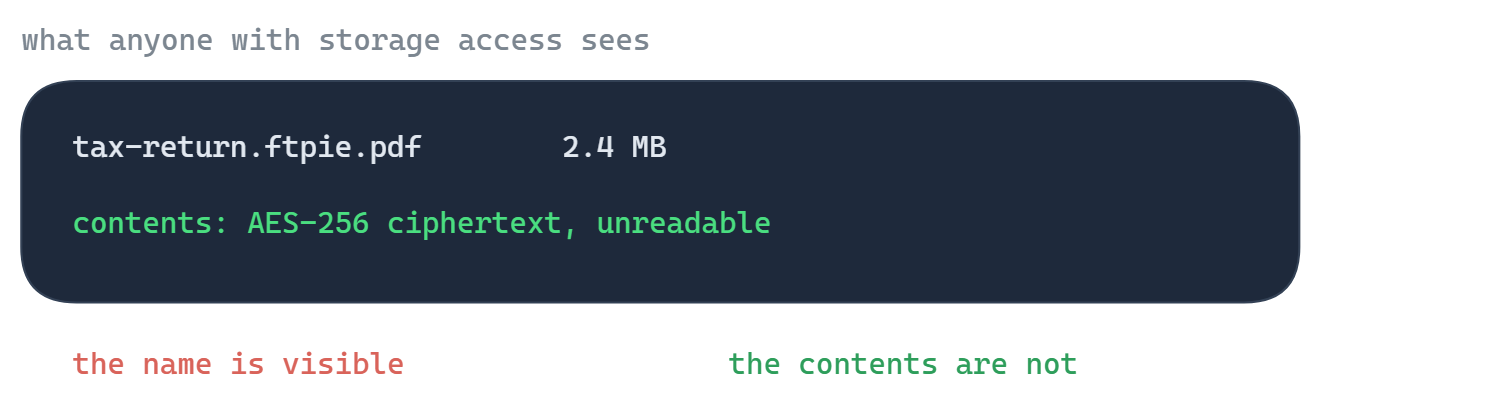
The honest limits: filenames stay visible (name.ftpie.ext - zip first if names are sensitive), encrypting requires FTPie Pro (decrypting is free for everyone), and there's no transparent "virtual drive" - you encrypt and decrypt deliberately, per file.

Side-by-side comparison

Feature FTPie Cryptomator
Transparent vault (virtual drive)
Filename encryption
Per-file encrypt / decrypt on demand
Works without a sync client (direct cloud APIs)
Encrypt on FTP / SFTP / WebDAV / NAS Partial
Send an encrypted file to a recipient (free decrypt)
Cloud-to-cloud encrypted transfer
Scheduled encrypted backups
Built-in file manager, editors & transfers
Open-source, audited format
Mobile apps
Free desktop version Partial

Pricing compared (2026)

Cryptomator's desktop app is free and open source (pay-what-you-want); the iOS and Android apps are paid, and Cryptomator Hub for teams is a subscription. FTPie's model:

  • FTPie Free - up to 3 FTP/FTPS/SFTP connections, free forever; decrypting .ftpie files is included
  • FTPie Pro - $9/month or $59/year; encrypting, clouds, WebDAV, NAS and the Pro tool set
  • Lifetime - a one-time license (currently $99 founder pricing), no recurring cost

If pure vault encryption at zero cost is all you need, Cryptomator wins on price - genuinely. FTPie's value is encryption plus the file manager, transfers, and automation around it. See the full plan comparison.

Switching from Cryptomator to FTPie

The two aren't format-compatible, so switching means re-encrypting:

  • Unlock your vault in Cryptomator and copy the files out to a local folder (they decrypt transparently).
  • Re-encrypt with FTPie - select the files, Encryption → Encrypt to…, and point at their destination storage; they arrive sealed.
  • Or run both. Genuinely fine: keep a Cryptomator vault for the synced folder on your own devices, use FTPie for encrypted transfers, remote storage, sharing, and backups. They don't conflict.

Try it with the free version or the 14-day Pro trial.

So which one should you pick?

Pick Cryptomator if your world is "one cloud, synced by its official app, and I want a private corner in it." A free, open-source, audited vault with filename encryption is exactly the right tool, and we won't pretend otherwise.

Pick FTPie if your files live in more places than one sync folder - FTP servers, NAS, several clouds - or if you need to do things with encrypted files: move them between storages, send them to people who can decrypt for free, back them up encrypted on a schedule. That's the file-manager-with-encryption model, and vaults don't cover it.

Coming from Boxcryptor's shutdown? Both tools are common landing spots - our Boxcryptor migration guide walks through the decision in detail.

Common questions

Is FTPie a good Cryptomator alternative?

It depends on the model you need. Cryptomator is a free, open-source vault: transparent encryption for one location, filenames included. FTPie encrypts individual files with AES-256 anywhere it connects - clouds, FTP, SFTP, NAS - inside a full file manager, with free decryption for recipients. Vault users staying in one synced folder should often stay with Cryptomator; people juggling multiple storages or sharing encrypted files get more from FTPie.

Is Cryptomator free?

The desktop app is free and open source (pay-what-you-want); the mobile apps are paid, and the team-oriented Cryptomator Hub is a subscription. FTPie's free plan covers FTP/FTPS/SFTP and can decrypt .ftpie files; encrypting requires Pro.

Can FTPie open Cryptomator vaults?

No. Cryptomator vaults use their own open format, and FTPie's .ftpie encryption is a separate per-file format. Migrating means unlocking the vault, copying files out, and re-encrypting with FTPie. Tools like Cyberduck and Mountain Duck can open Cryptomator vaults if you need vault access outside the official app.

Which one encrypts filenames?

Cryptomator - inside a vault, filenames are encrypted along with contents. FTPie keeps filenames visible (files become name.ftpie.ext); if names are sensitive, zip the files first and encrypt the archive so only the archive name shows.

Start Your 14-Day Free Trial

Download FTPie and start your free 14-day trial. Enjoy seamless FTP + cloud integration and keep using the free version afterward.

Download Free Trial
CASA Verified & VirusTotal Scanned
14-day trial · Free version included
Windows 10 & 11