2026.6.3 is one of the biggest FTPie releases of the year, and it finishes something I've been promising for a while. Two features that have sat on the roadmap as "coming soon" - File Encryption and a command-line interface - are now shipped and live in Pro. On top of that, this build adds two new storages, a proper one-click Restore for backups, backup notifications, a handful of browsing upgrades, and a long list of stability and performance fixes.
It also comes with a simpler pricing model. Here's everything that's new.
File Encryption - encrypt before it ever leaves your machine
When you upload a file to an FTP server, a NAS, or a cloud account, you're trusting whoever runs that storage with the readable contents of your data. For most files that's fine. For contracts, tax documents, client data or anything sensitive, it isn't.
File Encryption closes that gap. Right-click any file or folder, choose Encryption → Encrypt here (or Encrypt to…), set a password, and FTPie encrypts it on your machine with AES-256 before a single byte leaves your computer. Whatever it lands on only ever stores ciphertext, and the key never leaves your device - not to the storage provider, not to me.
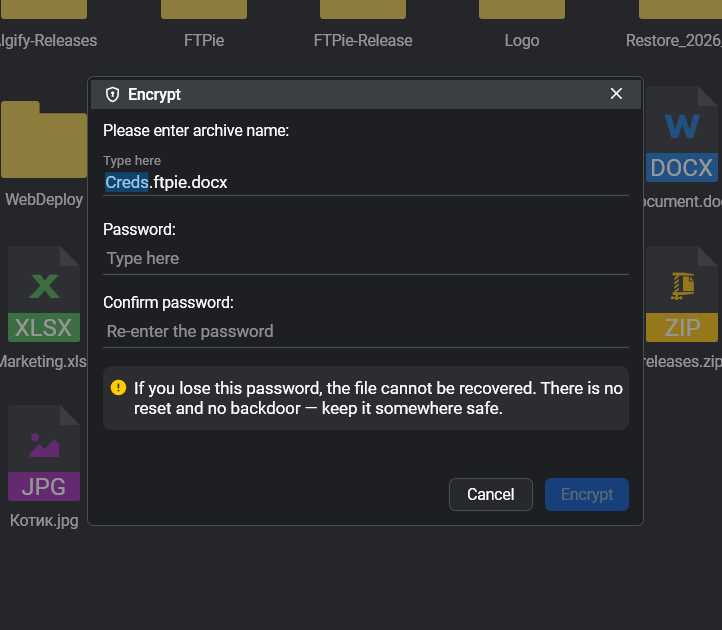
A few details worth knowing:
- Encrypted files are saved as
[name].ftpie.[ext]and now show a lock overlay in the browser, so it's obvious at a glance what's protected. - It works on a single file, a multi-selection, or whole folders (encrypted recursively, with the structure preserved - nothing is packed into one archive).
- Decryption is open to everyone. Encrypting is a Pro feature, but decryption
isn't gated - anyone, including Free users, can open a
.ftpiefile with the password. So you can send an encrypted file to someone who doesn't pay for FTPie and they can still get it open. - There's no back door. Because we genuinely can't read your files, we also can't recover them - if you lose the password, the file is gone. Keep it somewhere safe.
A command-line interface
The reason a lot of people reached for WinSCP or rclone over a friendlier GUI came down to one thing: they could script it. With this release, FTPie has a CLI too - and it runs the same engine and the same saved connections as the app, so a path that works when you click it works when you script it.
# List your saved accounts and their numeric ids
ftpie-cli accounts
# Upload a build folder to account 3, recursively
ftpie-cli upload .\build 3:/releases/latest -r
# Machine-readable output for scripts
ftpie-cli list 3:/reports --json
It ships with twelve verbs (list, info, search, size, new-folder, delete, copy, move, upload,
download, accounts, status) plus Unix aliases, --json output, clean Ctrl+C
cancellation, and documented exit codes so a script can branch on exactly what happened. The full
reference lives in the CLI docs. The CLI is a Pro feature (Pro or an
active trial).
Two new storages: OpenDrive and Koofr
FTPie now connects to OpenDrive and Koofr, bringing the total to 16 supported storage services. Both are available in this release - add them the same way you add any other cloud, from the add-storage wizard. See the full list on the supported services page.
Backups: one-click Restore and notifications
Auto Backups got the two things it was missing.
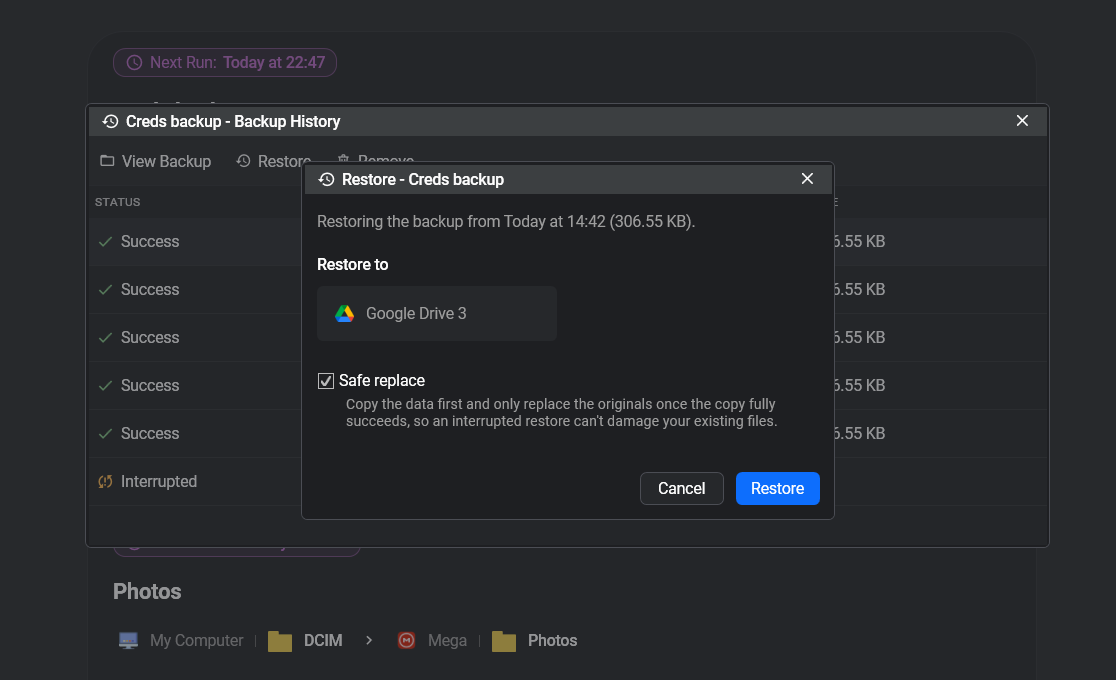
Restore finally makes recovery a single action. Pick a backup snapshot and restore it straight back to its original location or a new one - no more manually transferring data back yourself. It handles both plain and compressed (password-protected zip) snapshots, works across local, FTP/SFTP, NAS and cloud (including cloud-to-cloud), and uses safe-replace so an interrupted restore never destroys your live data.
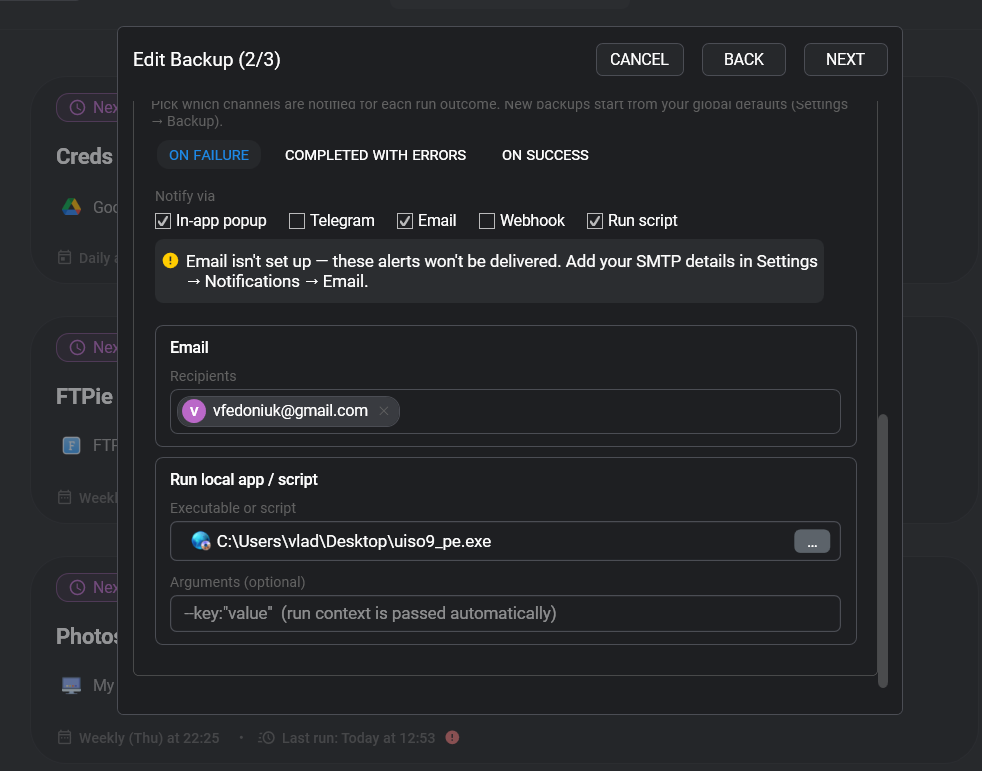
Notifications mean you no longer have to open FTPie to find out how a run went. Each backup can tell you the moment it finishes through an in-app toast, email (via your own Gmail/Outlook/SMTP), Telegram, a webhook, or by running a local app or script. Triggers are configurable per event - on failure, completed with errors, or on success - with sensible defaults you can override per backup.
Browsing and interface upgrades
- Shared by me - a dedicated folder for Google Drive and Dropbox to quickly see the files you've shared, alongside the existing "Shared with me".
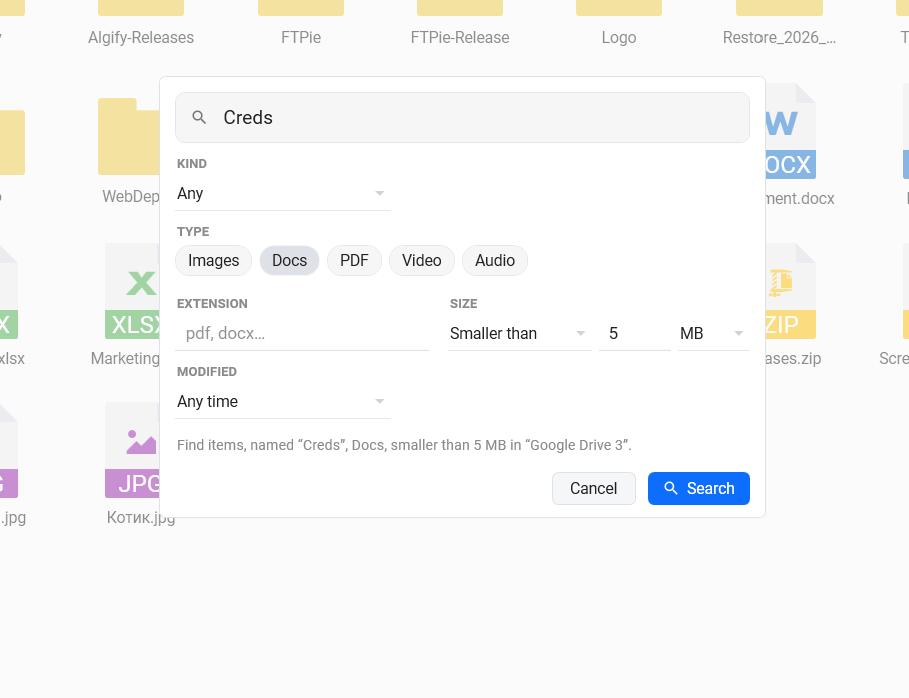
- Advanced search - a new search dialog with recursive search and filters for name, kind, type (images, docs, PDF, video, audio), extension, size and date. It's slower than the instant filter, but it digs through everything and gives you real control.
- Remember open tabs - optionally reopen your previous tabs automatically on launch, so you pick up where you left off.
- UI refresh - improved file-type icons, refined coloristics, a new toolbar style, and a selected-files info bar in the toolbar, plus the encrypted-file lock overlays mentioned above.
Media players
- Video player - new navigation buttons to skip +10s / -10s and jump to the next or previous video.
- Music player - more durable, with fewer crashes and better handling of files it previously couldn't play.
Stability and performance
- Fixed a Google Drive issue where a single failed file download could fail the whole transfer - the regression that affected some daily users.
- Fixed OneDrive file transfers failing in certain cases.
- Fixed unzipping password-protected zips that sometimes failed with a "Central directory not found" error.
- Fixed slow caching when saving multiple files with name collisions.
- Installer and database hardening for more reliable installs and upgrades.
Simpler pricing: just Free and Pro
Alongside this release, pricing got simpler. There's no longer a separate Max tier - everything that was planned for Max has moved into Pro. One paid plan, the complete app. That means Pro now also covers the things still on the way - enterprise object storage (S3, Azure, GCS) and folder sync / folder watcher - included at no extra cost when they ship.
Full breakdown on the pricing page.
Coming next
Scheduled Transfers is the next feature to land in Pro, arriving shortly after this release - recurring transfers between any two storages, on a timetable, with no scripts or Task Scheduler. After that, the focus shifts to object storage and folder sync.
Thanks
A lot of this release came directly from emails, reviews, and very specific bug reports - the Google Drive fix in particular. If you've sent feedback over the last few weeks, there's a good chance you're looking at it somewhere in this update. Thanks for using FTPie.